I manage a fleet
You keep every AED ready across one or more sites, and you answer when a unit is overdue. You plan inspections, watch expiry dates and keep the evidence for each site. See ReadyAED for facility managers.
One register for any brand. Inspections run on a phone, and the records stay in one place.
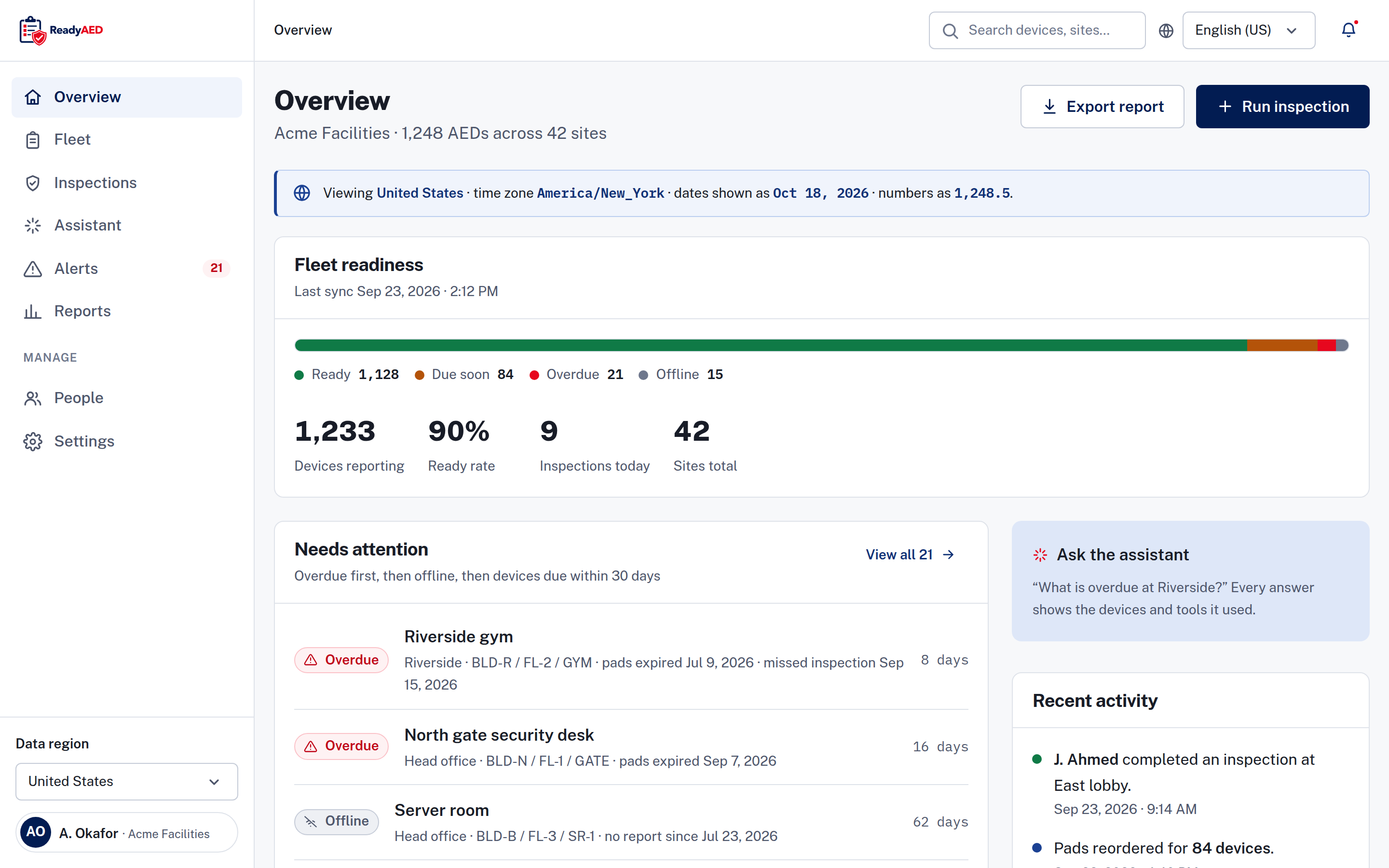
One status model, four states
ReadyAED is AED management software. It keeps one register for every AED you manage and shows you which units need attention first.
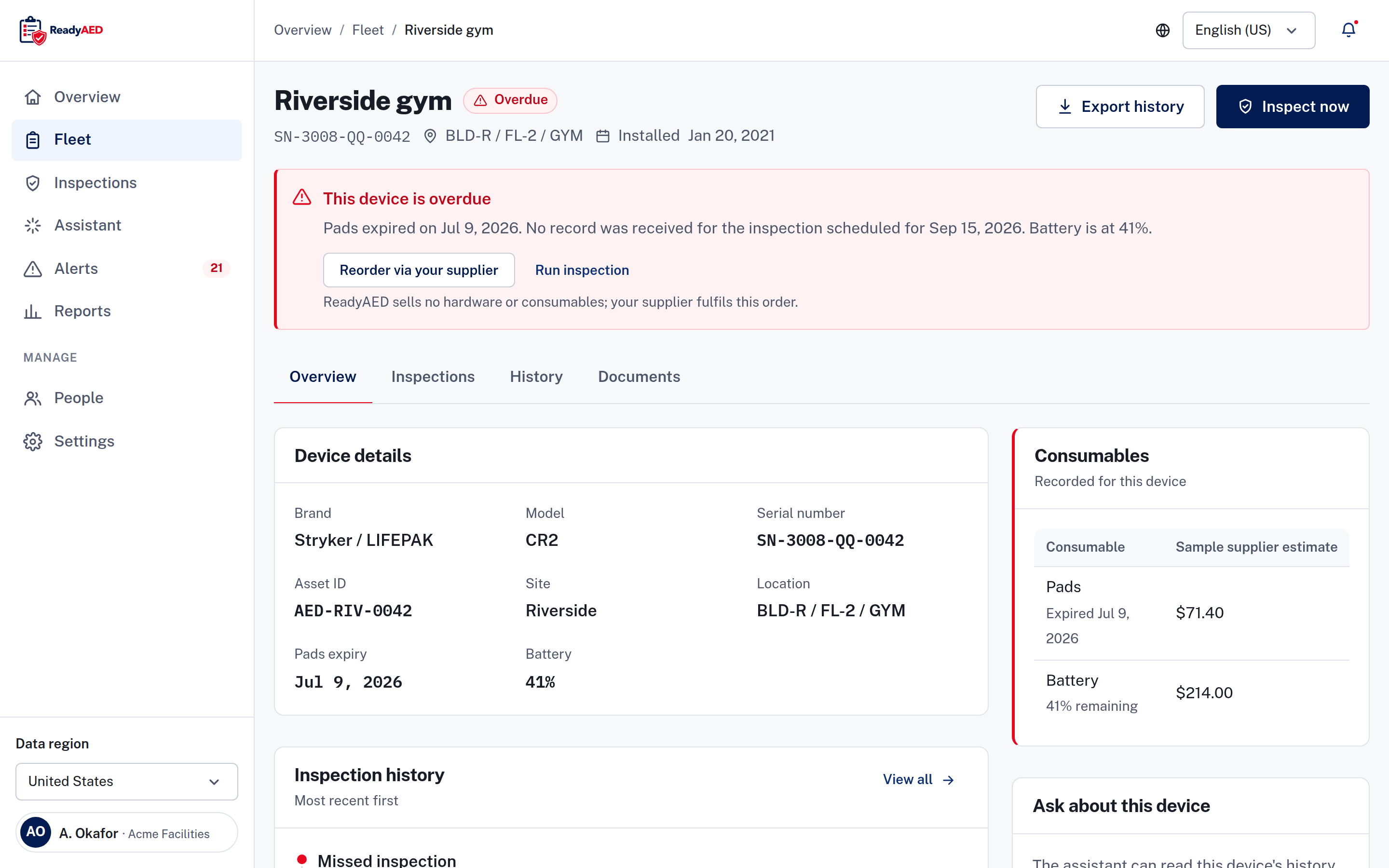
An AED (automated external defibrillator) can fail because a pad is past its date or a battery is flat. ReadyAED shows you both before they expire.
ReadyAED is built for the facility, safety and compliance teams who answer for an AED program. Your team inspects each unit. ReadyAED records the inspection, shows the next due date and keeps the history in one register.
The register, the inspection flow and the records share one status model, so everyone reads the same state for the same unit.
Any brand. One register.
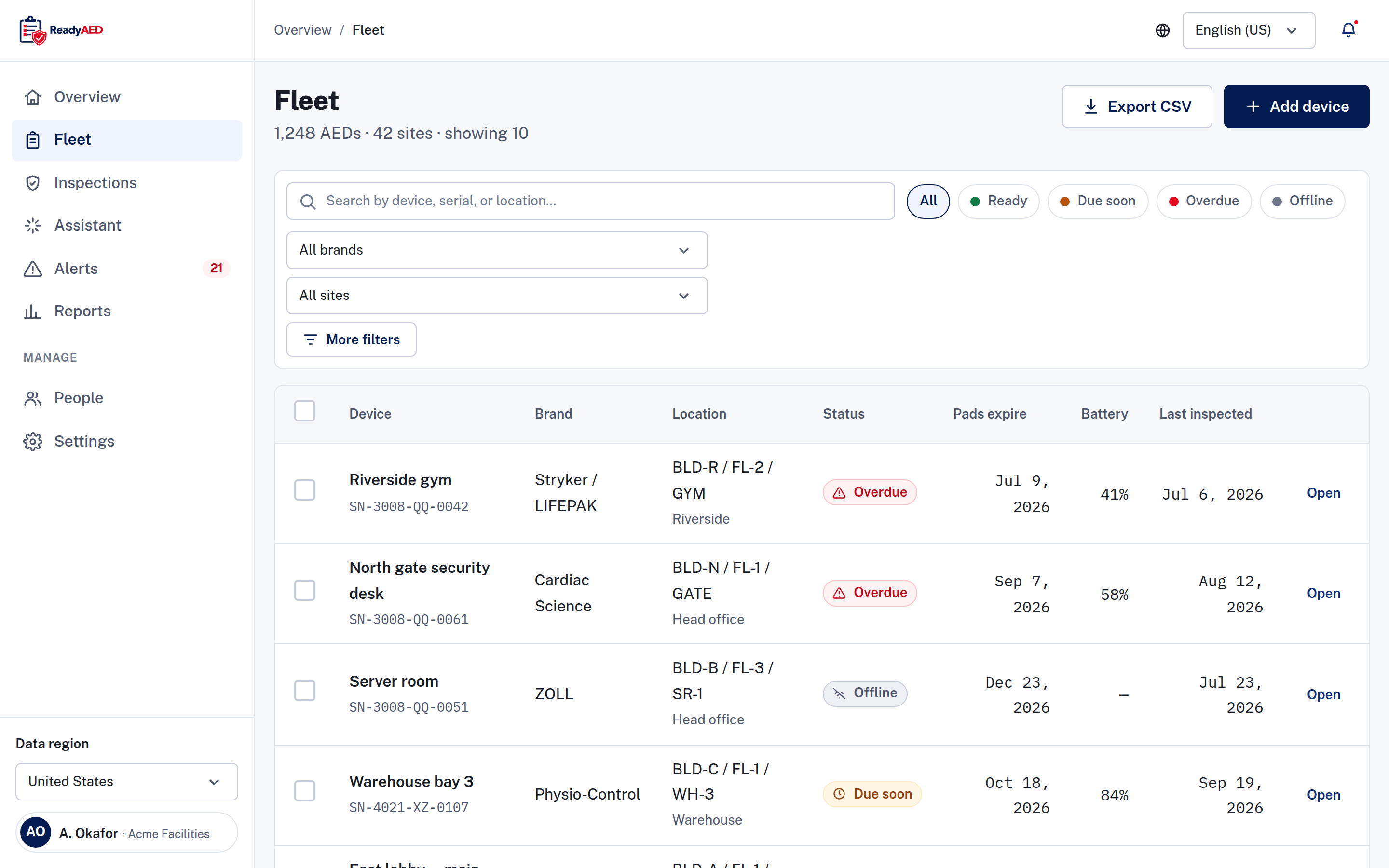
Your fleet is rarely one brand. A mixed fleet (AEDs from more than one brand) is normal. ReadyAED is hardware-agnostic, so one register holds AEDs of any brand. You do not need to change device brands, models or suppliers to keep one register.
Each device record keeps the brand, model, serial number and asset ID (your own label for the unit). The register filters by brand, so you can view one manufacturer at a time or the whole fleet at once.
Register, inspect, prove.
The register holds every unit. Each row shows the serial number, location path (building, floor and room), site, status, pads expiry, battery percentage and last inspection date.
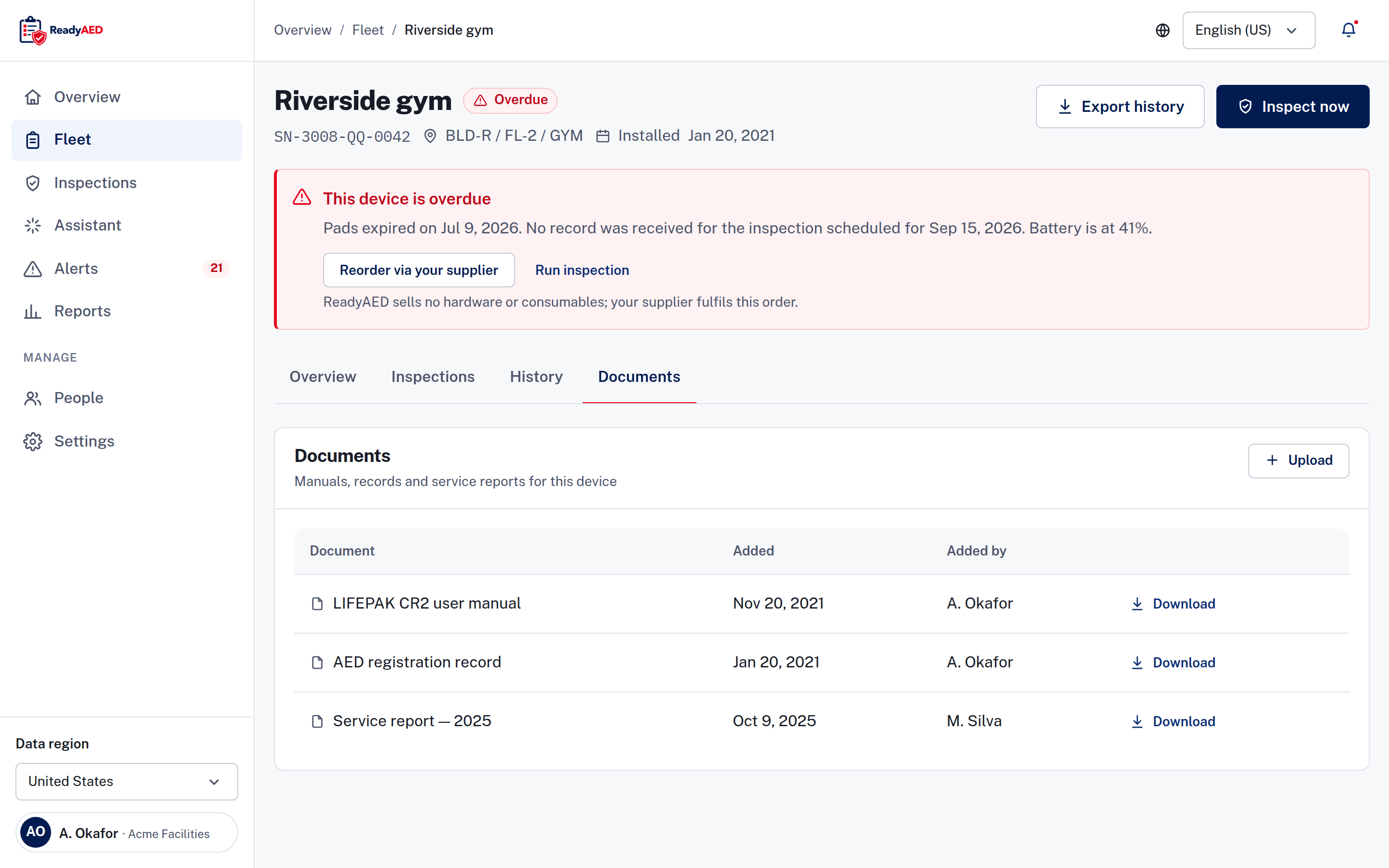
Status uses one model everywhere: Ready, Due soon, Overdue and Offline. Due soon means the device is due within 30 days. Offline means no report was received, so someone must check the device. Every status chip carries an icon and a word, so colour is not the only signal.
The register summary shows the count and share of devices in each state, and a needs attention list puts overdue units first.
Filter by status, brand or site. Search by device, serial or location. Export the register as a CSV (comma-separated values) file when you need the list elsewhere. Bulk actions work on selected rows: assign an inspection, reorder pads or export the list. Each device also has a printable QR code. Scan the code to open the device record.
The register shows consumables for the next 90 days: pads, batteries and rescue kits, the number of devices affected and the reorder cost. You can create a purchase order in the app. Partners fulfil the order, because ReadyAED sells no consumables.
The inspection flow works in the browser on Android and iOS phones. Your team installs nothing. You can start an inspection from the register, from the overview or from one device record.
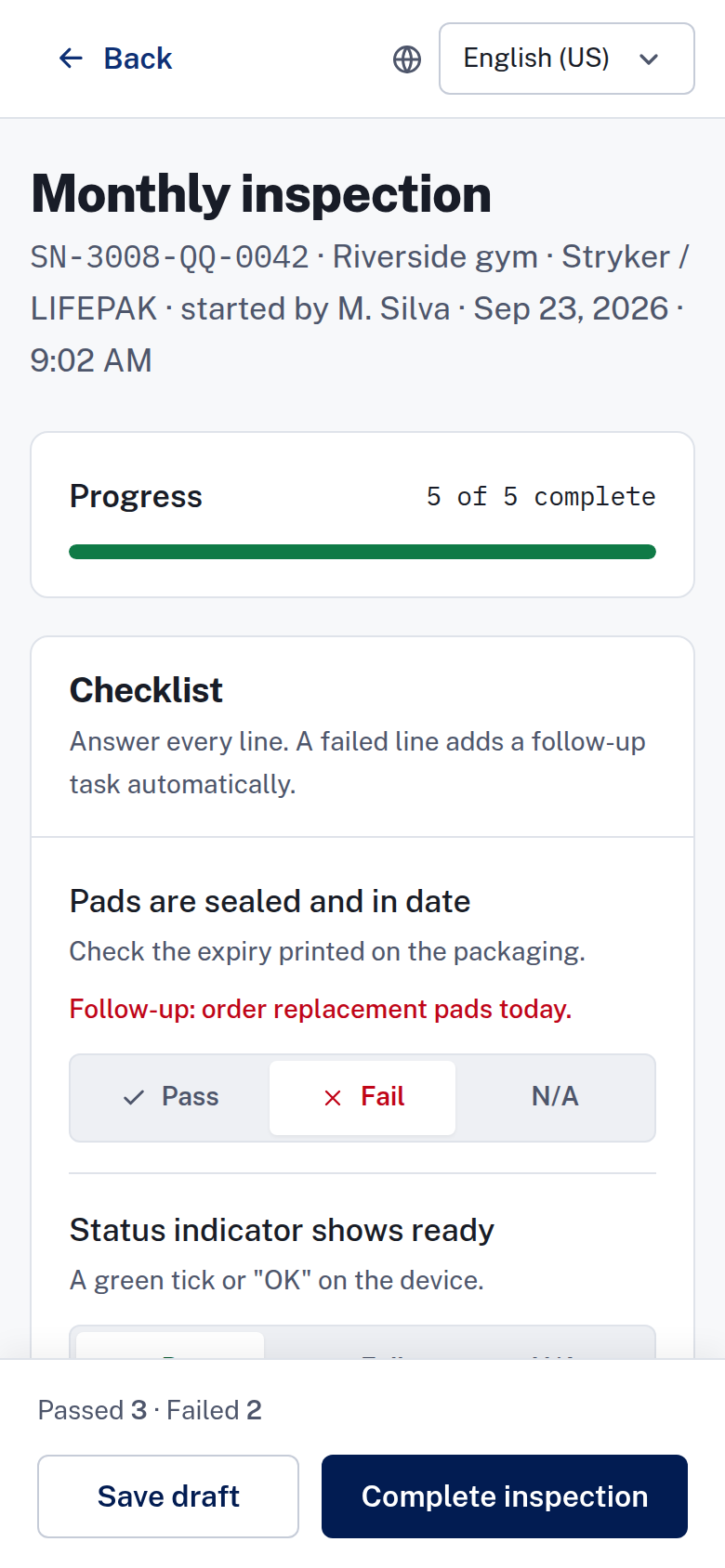
Five checklist lines cover the pads, the status indicator, the battery, the cabinet and the rescue kit. Your team answers each line Pass, Fail or N/A, and every line must be answered before the inspection is complete.
When a line fails, ReadyAED adds a follow-up task automatically, such as ordering pads or clearing an obstruction. Notes and photos are optional, and a photo can be a JPG or a PNG file up to 10 MB. The screen keeps a progress bar, passed and failed counts and a save draft action for an inspection that stops halfway.
An audit trail records user and system events, device history and inspection history. The device timeline shows automatic status changes and location updates.
Inspection notes stay with the record and are shared with the site team. Device records also hold manuals, certificates and service records, uploaded per device. Export a report, a CSV file or a device history when you need evidence. The records sit in one place, not in a binder on a shelf.
legal-approved disclaimer text this passage needs legal sign-off
Every figure below carries a named source and the date it was measured. We do not publish a number we cannot show.
approved units under management and site counts
approved units under management and site counts
product confirmation required before publishing this claim
approved uptime figure
The counters are static text. We switch to a live feed only when one exists, and then we name the feed.
You keep every AED ready across one or more sites, and you answer when a unit is overdue. You plan inspections, watch expiry dates and keep the evidence for each site. See ReadyAED for facility managers.
EHS (environmental, health and safety) covers the whole estate. You answer for the program across every site, and you report on it. You set the standard, and you need to know which sites follow it. See ReadyAED for EHS leaders.
You keep the evidence an audit asks for, and you handle medical direction for the program. You answer the auditor questions and keep the program records straight. Start with Medical direction and the AED Law Center.
You supply or refer AED programs to the same teams. You want one software to offer alongside the hardware and consumables you supply. See Partners for the program and how to apply.
Every tool has a best fit. Alternatives lists the software and the spreadsheets teams use today, with a short line on each one and a link to the full comparison.
Each comparison covers the feature set, the pricing model, the migration path and the parts the other product does well. If another product suits your work better, the comparison says so. A comparison that hides the losses is not useful to you.
We do not claim a win without a source. A statement about another product comes from that product's own page, with the date we checked it.
ReadyAED charges one flat rate for the software. The price is approved price.
We sell no hardware and no consumables. Partners fulfil pads, batteries and rescue kits, and you can create a purchase order in the app.
See Pricing for what the flat rate covers.
customer logo wall — needs approved customers
case-study metrics — needs approved customer figures
customer quote and name — needs written customer approval
We do not publish a customer name, logo or number without written approval from that customer.
One register holds every AED, whatever the brand. The device record keeps the brand, model, serial number and asset ID, and the register filters by brand and by site. Brand and site filters keep a large estate readable. You do not replace any hardware to use ReadyAED.
Medical direction is delivered through licensed physician partners. ReadyAED does not practice medicine, and the software has no physician-oversight screens.
The partners and the markets they cover are not published yet: named medical-direction partners and the markets they cover
legal-approved disclaimer text this passage needs legal sign-off
SOC 2 is in progress. A BAA (Business Associate Agreement) is available. We publish only the controls we can evidence, and the Security & Trust Center states the current position. If a control is not evidenced, the page does not list it. A data-region selector offers US, UK, EU, India and APAC, and the region is a product setting.
legal-approved disclaimer text this passage needs legal sign-off
You add devices to the register one at a time. Bulk import and migration tooling are not confirmed: confirmation of bulk import or migration tooling
Every device record starts with the facts you enter, and the inspection history builds from there. Bring this question to the demo, and we walk through your current register with you.
Book a demo and we walk through the register, the inspection flow and the records. You see the same screens your team will use. Bring your questions about your sites, your brands and your current register.