
Audit-ready compliance records, without the binder.
Inspection records, device history and an audit trail in one place, exportable for your auditor.
The problem
You own an AED (automated external defibrillator) program. You work in compliance or EHS (environment, health and safety). An auditor asks for the inspection record for one device. The record sits in a binder, a spreadsheet or an email folder. ReadyAED keeps inspection records, device history and an audit trail in one account. Your team inspects each AED on a schedule, and the record stays with the device.
The binder and the spreadsheet
Most AED programs start with a binder and a spreadsheet. Each site keeps its own copy. An inspection happens, and someone writes the date on a page.
When an auditor asks for a full record, someone must gather the pages. The binder is in one building. The spreadsheet is on one laptop. The photo of a failed pad sits in a phone gallery.
Records go missing in ordinary ways. A site skips a month. A page never makes it back to the binder. A device moves to another floor, and the location list stays the same. One site cannot compare its records with another, because each site keeps its own copy.
Why the gap matters
A missing record is a record-keeping gap. It is not proof that the device failed. But the reviewer sees the record, not the work behind it.
A complete history answers questions without a search through three systems: which device, which date, which inspector, what result. The same four questions come up in every review.
How it works
Your team runs the inspection
Your inspector opens the inspection flow in the browser on an Android or iOS phone. The checklist has five lines:
- Pads sealed and in date.
- Status indicator shows ready.
- Battery within range.
- Cabinet unlocked and unobstructed.
- Rescue kit sealed and complete.
Each line takes an answer of Pass, Fail or N/A. Every line must be answered before the inspection is complete. A failed line adds a follow-up task automatically. Notes and photos are optional and stay with the inspection.
The record lands on the device
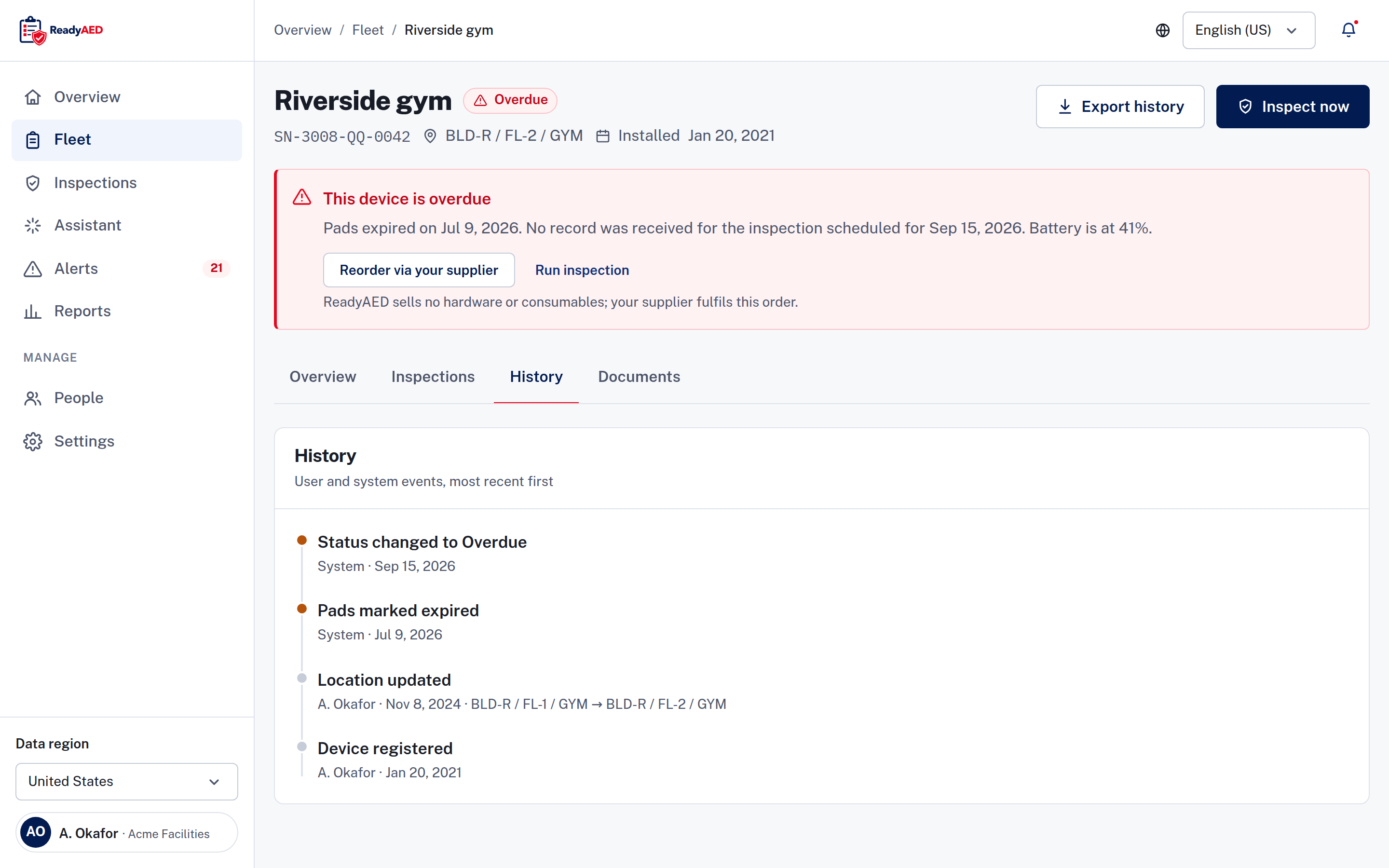
The result goes to the device record: the date, the inspector, the checklist answers, the battery reading, the note and any photo. The inspection history appears as a timeline and as a table. The device record also holds the brand, model, serial number and asset ID. It keeps the site, location, pads expiry and battery. Event history, documents, the assigned custodian and the last inspector stay with the device.
The audit trail fills in
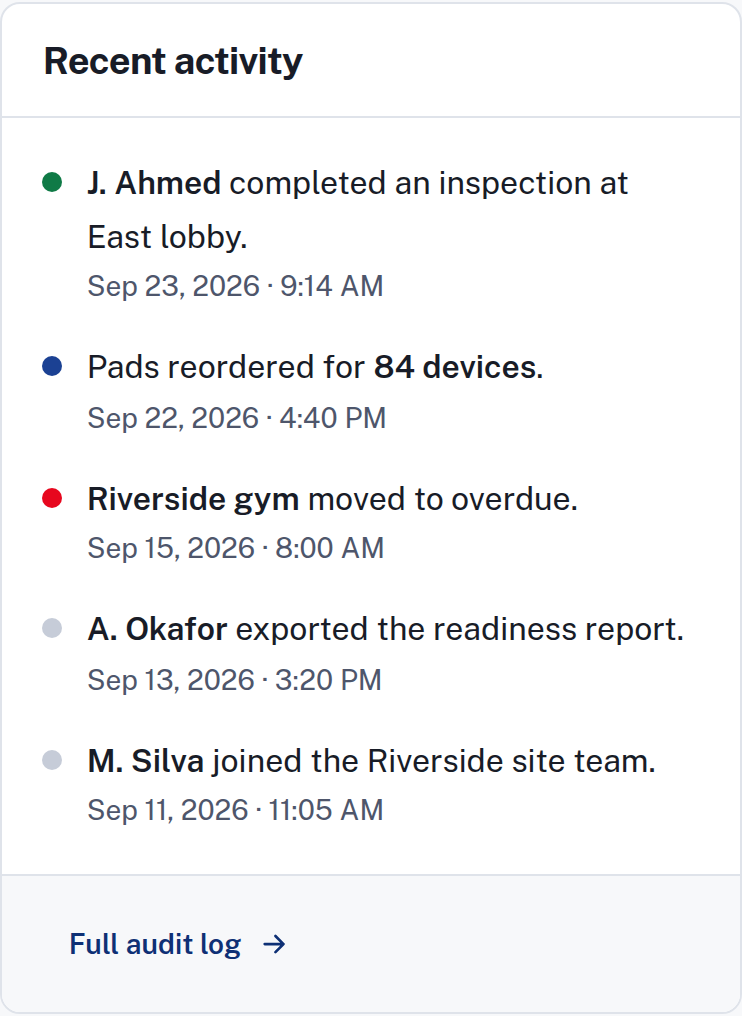
An audit trail records user and system events, device history and inspection history. The activity feed shows the latest events and links to the full audit log. The read-only assistant answers questions about your devices, for example what changed this week. Every answer lists the queries behind it. ReadyAED sends five email templates: inspection due, overdue, device used, weekly digest and invite.
You export what the reviewer needs
ReadyAED exports three formats: a report, a CSV file and the device history. A CSV file opens in a spreadsheet. Run an export for an audit, a board meeting or a handover to a new program owner.
What the law asks for
US AED laws differ by state. Registration, inspection, training and protections vary. The AED Law Center collects general information on US AED law. Per-state coverage and legal review are not confirmed. The guidance there is general information, not legal advice. legal-approved disclaimer text this passage needs legal sign-off
What it replaces
The binder
A binder holds paper. ReadyAED holds the device record, with the inspection history as a timeline and a table. Upload manuals, certificates and service records to the device. Print a QR code for each device, and a scan opens the device record.
The spreadsheet
A spreadsheet holds dates until someone forgets to update a row. ReadyAED keeps one register with serial number, location path, site, status, pads expiry, battery percentage and last inspection date. Filter by status, brand or site. Search by device, serial or location. Select rows to assign an inspection, reorder pads or export.
The tool you use today
If your records live in another tool today: confirmation of bulk import or migration tooling. If your records live in a spreadsheet, the comparison vs spreadsheets covers the difference.
Proof
Verified today
- An audit trail records user and system events, device history and inspection history.
- Exports: a report, a CSV file and the device history.
- A scheduled inspection and a missed inspection both appear on the device timeline.
- One status model with four states: Ready, Due soon, Overdue and Offline (no report received from the unit). Each state carries an icon and a word.
- Security posture, stated exactly: SOC 2 is in progress. A BAA (Business Associate Agreement) is available. See the Security & Trust Center.
Not verified yet
- Record retention: product confirmation required before publishing this claim
- Whether the audit trail can change after an entry: engineering and legal confirmation of immutability
- Customer proof: customer quote and name — needs written customer approval
- Scale: approved units under management and site counts
What ReadyAED does not do
ReadyAED does not certify compliance and does not give legal advice. Compliance depends on your state and your program. legal-approved disclaimer text this passage needs legal sign-off
FAQ
Does ReadyAED make my AED program compliant?
No. ReadyAED does not certify compliance. The software keeps inspection records, device history and an audit trail in one place. Your compliance depends on your state and your program. legal-approved disclaimer text this passage needs legal sign-off
What does the audit trail record?
An audit trail records user and system events, device history and inspection history. The activity feed shows the latest events. On a device, the inspection history appears as a timeline and as a table. Each entry shows the date, the inspector, the result, the battery reading and the note.
How long does ReadyAED keep records?
The retention period is not published yet. product confirmation required before publishing this claim
Can I export records for an auditor?
Yes. ReadyAED exports three formats: a report, a CSV file and the device history. The CSV file opens in a spreadsheet. You can include the export in an audit pack or a board report.
Who inspected the AED in the east wing last month?
Open the device record. It shows the assigned custodian, the last inspector and the inspection history with dates and results. For a larger fleet, filter the register by site or search by device, serial number or location.
What happens when an inspection line fails?
A failed line adds a follow-up task automatically. The task calls for the right action, for example a pad replacement, a service request or a restocked rescue kit. Consumables are fulfilled by partners. ReadyAED sells no consumables.
Does ReadyAED keep inspection photos?
Yes. Photos are optional on each inspection. The format is JPG or PNG, 10 MB or smaller, from the camera or the library. The photo stays with the inspection.
Can I pull the record for a single device?
Yes. Open the device record and export the device history. The record shows the inspection history and the event timeline for that device. The register covers the whole fleet.
How do you handle medical direction?
Medical direction is delivered through licensed physician partners. ReadyAED does not practice medicine. Read Medical direction explained for the partner model. legal-approved disclaimer text this passage needs legal sign-off
How do you help with US state requirements?
The AED Law Center collects general information on US AED law. Per-state coverage and legal review are not confirmed. The guidance is general information, not legal advice. legal-approved disclaimer text this passage needs legal sign-off
See the register, the inspection flow, the audit trail and the exports on a live call.
ReadyAED keeps compliance records: inspection records, device history and an audit trail in one place, exportable for your auditor. See the Features hub for the full picture.