
An AED spreadsheet alternative: one live register for every unit
Compare a hand-kept spreadsheet with ReadyAED for an AED program, item by item.
A spreadsheet is the file most teams start with. It holds a list of units, a location column and a few dates. ReadyAED is AED (automated external defibrillator) readiness and compliance software.
This page compares the two ways to keep an AED register. The spreadsheet side describes the common manual process, and the ReadyAED side describes the product. The page makes no external claims.
Last verified 23 September 2026.
Who a spreadsheet is best for
A spreadsheet works when the fleet is small and stable.
One person keeps the file current, the unit count changes once a year, and nobody outside the team needs a live record.
Three signs that a spreadsheet is the better fit:
- The fleet fits on one screen, and one person knows every unit by its location.
- Nobody outside the team asks for a record, a status or an audit trail.
- The team rarely changes, and no one new needs to learn the file.
When any of those signs changes, the limit moves from the fleet to the file. A cell shows what someone typed at the time. It does not show what is true now.
Ask what your team does when the one keeper is away for two weeks. The answer usually shows where the file stops working.
ReadyAED vs a spreadsheet: where we differ
The table compares a hand-kept spreadsheet with ReadyAED. The spreadsheet column describes the common manual process.
| What a facility manager asks | ReadyAED | A spreadsheet |
|---|---|---|
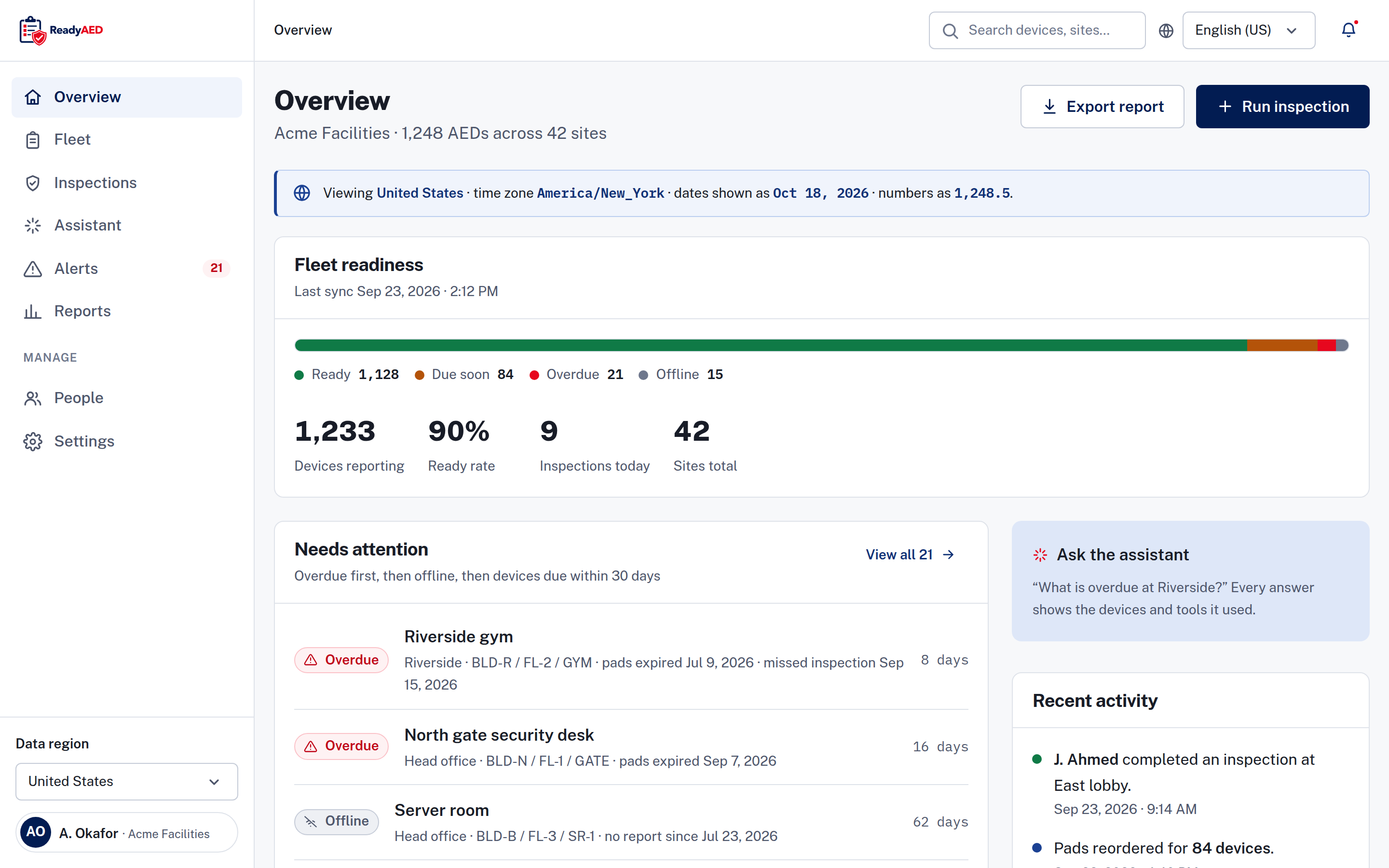
| What is in the register? | One live register for AEDs of any brand, with serial number, site, location, status, pads expiry, battery percentage and last inspection date. | A list of rows typed by hand. The file shows the values someone entered, not the current state of each unit. |
| What is the status of each unit? | Four states: Ready, Due soon, Overdue and Offline. Each state carries an icon and a word, never colour alone. | No status model. A reader compares dates in two columns and decides. |
| What expires next? | A 90-day view of pads, batteries and rescue kits, with the devices affected and the reorder cost. | A date cell. Nothing flags the date when it passes. |
| How does an inspection work? | Five checklist lines on a phone-first screen. Every line must be answered Pass, Fail or N/A, and a failed line adds a follow-up task. Notes and photos are optional. | A row per inspection. Notes and dates live in cells, and the checklist lives in memory or on a printed form. |
| Where is the record? | A device record with inspection history, event history and documents, and an audit trail for user and system events. Exports: report, CSV and device history. | The file itself. Version history depends on how the file is stored, and two copies can disagree. |
| Who can see and update it? | Site staff are invited into the account. Each device shows an assigned custodian and the last inspector. | Access depends on who holds the file and who received the last email. |
| What does it cost? | One flat rate for the software, not per device. The rate is approved price. Software only, with no hardware or consumables for sale. | No licence fee. The team keeps the cells current by hand. |
The ReadyAED column describes the product as reviewed. The spreadsheet column describes the common manual process, checked on the date at the top of this page. Where a detail is not stated, the cell says so instead of guessing.
Medical direction is not part of this comparison. ReadyAED delivers medical direction through licensed physician partners. ReadyAED does not practice medicine. named medical-direction partners and the markets they cover legal-approved disclaimer text this passage needs legal sign-off
How the two pricing models differ
A spreadsheet has no licence fee. ReadyAED charges one flat rate.
A spreadsheet has no licence fee. Your team keeps every cell current by hand.
ReadyAED charges one flat rate for the software, not per device. The rate is approved price. You pay for the software, and the register changes as your team inspects, updates dates and uploads records.
Both models are honest choices. They charge for different things. The question is which one matches the fleet you manage now. A sheet works while the file and the fleet stay in step. ReadyAED works when more than one person needs the record, or when a date must flag itself.
Four questions sort any register: who updates it, what happens when a date passes, who can read the record, and what an auditor receives. ReadyAED answers with the register, the four states, the audit trail and the exports. The spreadsheet answers with the cells your team keeps current.
Mixed fleet and data out
A spreadsheet can hold any brand. ReadyAED reads the register back to the team.
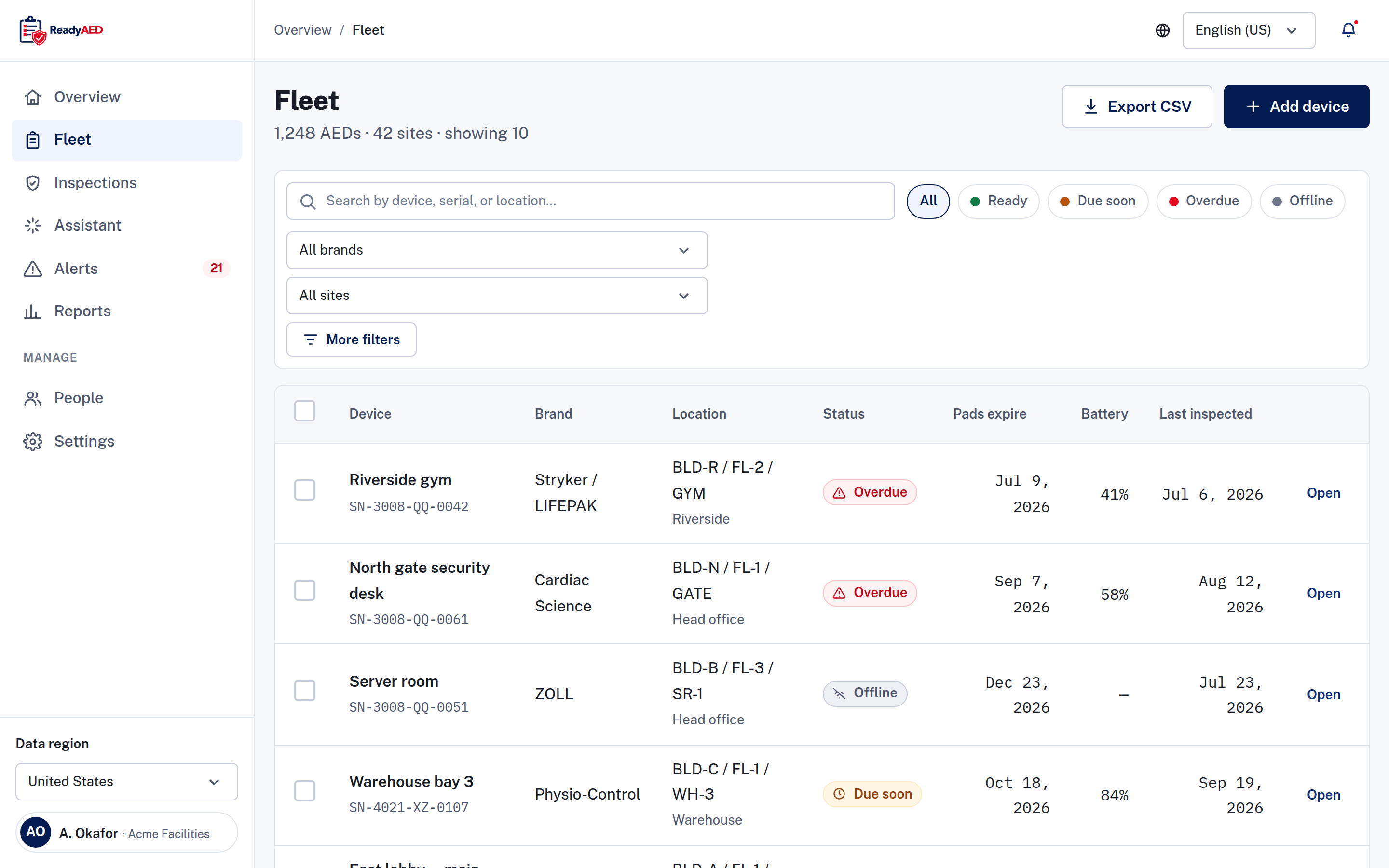
A spreadsheet can hold any brand in one file, and that is its strength. The limits appear in the details. A mixed fleet has different pads dates, different battery rules and different status lights. A row of typed values does not read the cabinet.
ReadyAED keeps one register for AEDs of any brand, with a Brand column and one status model. Filter by brand or by site, and every line holds the same fields. Mixed fleet covers the register and the device record.
On data out, the line is clear. Exports are report, CSV and device history, and the data leaves the product in those forms. Company SSO is the only integration shown in the product today. REST API, webhooks and HRIS or EHS integrations remain unconfirmed: product confirmation of REST API, webhooks and HRIS/EHS integrations, with named systems.
Moving from a spreadsheet to ReadyAED
Add each line, keep the sheet, then retire it.
Before the move, mark the rows that hold a value nobody can confirm, such as a pads date with no note. Check those units first, because the register starts with the fields you trust.
- Keep the spreadsheet in its current form. Do not retype it into another spreadsheet.
- Add each row of the sheet to ReadyAED as a device. Bulk import is not confirmed: confirmation of bulk import or migration tooling.
- Enter the fields the sheet holds for the row: brand, model, serial number, asset ID, site, location, pads expiry and battery reading.
- Upload the manuals and service records that sit beside the sheet.
- Run the first inspections from ReadyAED and make sure that the register matches the sheet.
- When every line matches, mark the spreadsheet read-only and keep it for your records. Retire it after your next audit.
When to choose the spreadsheet
Choose a spreadsheet if the fleet is small, the team is stable and nobody outside the team needs a live record. A spreadsheet costs nothing to start, fits any local process, and works on a laptop with no network and no vendor. If one reader can name every unit in one sitting, the file is enough.
Choose ReadyAED when the register must show its state without a phone call, when more than one site holds units, or when someone else must read the record. That is the point where a typed list stops answering the question.
Questions facility managers ask before moving off the spreadsheet
Does ReadyAED offer anything a spreadsheet cannot?
Yes. ReadyAED adds a live status model, a 90-day expiry view, phone-first inspections with photos and follow-up tasks, device history and an audit trail. A spreadsheet holds typed values. ReadyAED holds the work and its record. Mobile inspections covers the checklist, and Expiry & consumables tracking covers the dates.
Can I import my spreadsheet into ReadyAED?
Bulk import and migration tooling are not confirmed: confirmation of bulk import or migration tooling. The Fleet screen adds one device at a time today.
Can I keep the spreadsheet as a backup?
Yes. Keep the sheet read-only during the move, and make sure that each line matches the register before you retire it. The export formats in ReadyAED are report, CSV and device history.
What does ReadyAED cost compared with a free spreadsheet?
ReadyAED charges one flat rate for the software, not per device. The rate is approved price. We publish no price comparison with another product. A spreadsheet has no licence fee.
Does ReadyAED track other assets, like fire extinguishers?
No. ReadyAED tracks AED programs: AED units, pads, batteries, rescue kits, inspections and records. Other assets stay with the process your team uses for them.
ReadyAED vs a spreadsheet: which is better for an audit?
An audit needs a record of who inspected each unit and when. ReadyAED keeps that record in the device history and the audit trail, and the exports are report, CSV and device history. A spreadsheet keeps the values that someone typed into it.
Can more than one person use the register at the same time?
Yes. Site staff are invited into the account, and the register shows who inspected each device and when. A shared sheet also works, and two people editing the same copy can overwrite each other's changes.
Bring your current sheet
We show how one register holds every unit, how the four states read and what the audit trail keeps.
One flat rate covers the register after the sheet. See Pricing for the commercial model and run your own numbers in the ROI calculator.