ReadyAED

An AED program for EHS leaders: one standard across every site

One register, one checklist and one status model for every site. ReadyAED shows which sites are ready and which sites need action.

You run EHS (environmental, health and safety) for your sites. The AED (automated external defibrillator) program is one of the programs you answer for, and it runs at every site you own or lease.

ReadyAED keeps one register for every AED at your sites. The register is a single list of every unit and its status. Each line carries the site and the location path, so you read the program from one place instead of a folder per site.

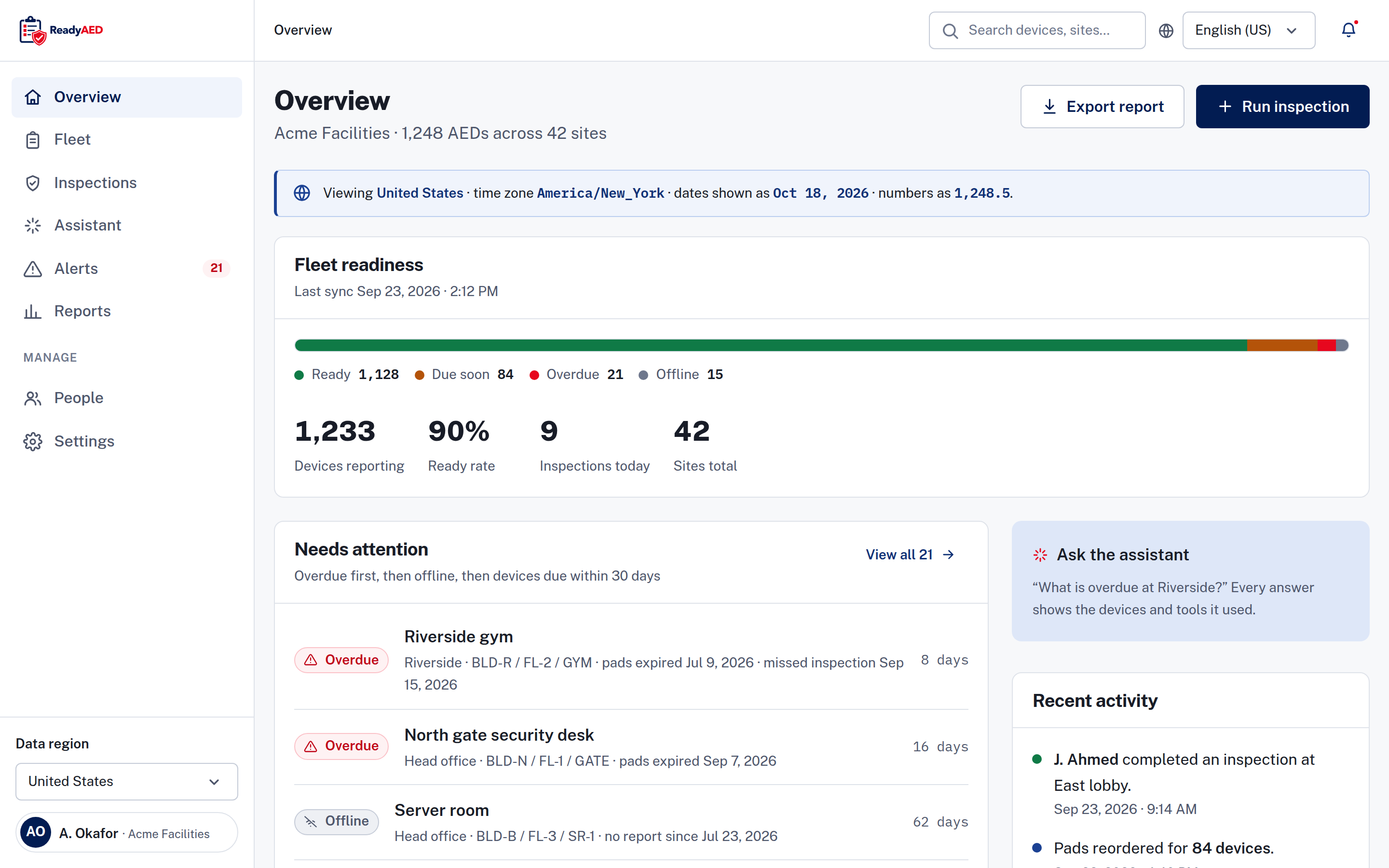
Fleet overview with a readiness meter, a needs attention list and a recent activity feed, showing sample data.

KPIs for EHS leaders

KPIs are the numbers you report to leadership.

Readiness across your sites

The overview shows the count and share of devices in each of the four states: Ready, Due soon, Overdue and Offline. It also shows the total number of sites and a needs attention list with overdue units first. The register filters by site, so you can read every site or one location without leaving the page.

Sites that miss a check

An overdue state means the unit is past its expiry or its inspection was missed. The device timeline shows a scheduled inspection that was missed, so the gap stays visible after the week it happened. ReadyAED includes email templates for an inspection that is due, an inspection that is overdue and a weekly digest.

One standard at every site

Every unit in the register uses the same five-line checklist and the same four states, whatever the brand or the site. Site staff are invited into the account, and devices are assigned to a person. The device record shows a site custodian (the person at the site who looks after the units) and the last inspector. One standard is easier to audit than a different form at every location.

Program records for the review

An audit trail records user and system events, and the device record keeps its own history. You can export a report, a CSV (comma-separated values) file or a device history when leadership or an auditor asks for the program position.

Your daily reality

Every site keeps its own list

Sites do not wait for each other. Each one buys a unit, books a check and keeps its own sheet. Your sites then hold several versions of the same program, and no two lists agree on the next due date.

A missed check hides in a site file

A site that skips a month still looks healthy from a distance. The gap shows up at the annual review, when someone must collect the records and explain the missing weeks. By then the people involved have moved on.

Leadership asks for one answer

The question is always the same: is every site ready? A folder per site cannot answer it. You need one view with one status model, and you need the detail behind each number when a site manager disagrees with it.

One register for every site

ReadyAED holds every unit in one register with its site and location path. Filter by site or by brand, search by device, serial number or location, and export the list as a CSV file. The same status model applies to every site, so a conversation about one unit uses the same words everywhere.

Features that matter

Readiness dashboard

One status model for every unit, with a register summary and a needs attention list that puts overdue units first. Filter by site to read one location or every site. Readiness dashboard covers the states, the filters and the device record.

Compliance automation

Inspection records, device history and an audit trail in one place, ready to export. Compliance automation covers the records, the exports and the state-law limits.

Multi-site management

Site filters, per-site counts and a custodian on each site keep many sites readable. Multi-site management covers the site view and the site custodian.

What is proven, and what is not

What we can show today

One register for AEDs of any brand, across every site in the account. Four states carry an icon and a word. The overview reports the sites total and the readiness share. Email templates cover an inspection that is due, an inspection that is overdue and a weekly digest. An audit trail records user and system events.

ReadyAED is software only. It does not sell or make AEDs, pads, batteries or cabinets. Consumables are fulfilled by partners, and you can create a purchase order in the app.

What still needs approval

Estate scale and customer proof are not approved yet, so we mark the gaps instead of filling them with estimates.

  • approved units under management and site counts
  • customer quote and name — needs written customer approval
  • customer logo wall — needs approved customers

FAQ: questions EHS leaders ask before a demo

How do I see AED readiness across every site?

The overview shows the count and share of devices in each of the four states. It also shows the sites total and a needs attention list with overdue units first. The register filters by site, so you can move between the full list and one location.

How do I know when a site misses an inspection?

An inspection that is missed leaves the unit in the Overdue state, and the device timeline shows the missed scheduled inspection. ReadyAED also includes email templates for an inspection that is due, an inspection that is overdue and a weekly digest.

Does ReadyAED connect to our EHS system?

The integration list is not confirmed yet: product confirmation of REST API, webhooks and HRIS/EHS integrations, with named systems. Company SSO sign-in is shown in the product today.

How do we set one standard across sites?

Every unit uses the same five-line checklist and the same four states, whatever the brand or the site. Site staff are invited into the account, devices are assigned to a person, and each device record shows a site custodian and the last inspector.

What does the program cost across many sites?

ReadyAED charges one flat rate for the software. The price is approved price. See Pricing for what the flat rate covers.

Book a demo

Bring your site list to the demo. We show how the register reads across sites, how a missed check stays visible and how the records leave the account for a review.

The Solutions hub lists the other role pages.