Stryker LIFELINKcentral alternative: one register for any AED brand
Compare Stryker LIFELINKcentral with ReadyAED for an AED program. Every Stryker fact comes from the LIFELINKcentral page.
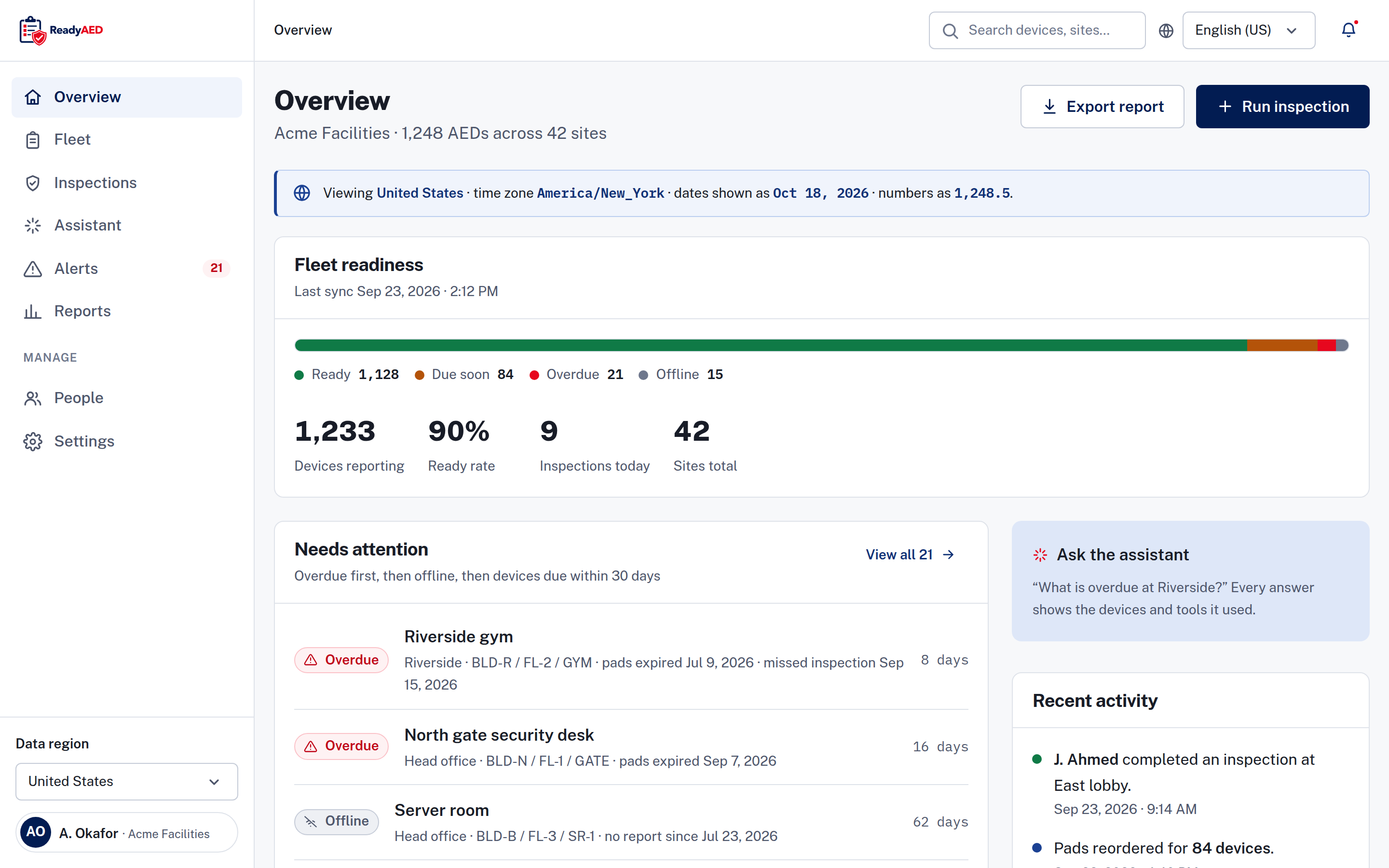
LIFELINKcentral is an AED program manager from Stryker, an AED manufacturer. ReadyAED is a software-only register for any AED brand, including your Stryker and LIFEPAK units, with no monitoring hardware.
This page compares the two products for a facility or safety manager who runs an AED (automated external defibrillator) program. Every fact about LIFELINKcentral cites the Stryker product page.
Last verified 23 September 2026.
Who LIFELINKcentral is best for
LIFELINKcentral fits an organization that runs Stryker AEDs and wants the manufacturer to cover part of the program work.
The page leads with service delivery: program implementation, a dedicated program support contact and post-event support.
The feature list includes remote monitoring for Stryker AEDs, a map view, readiness alerts, a dashboard for sites, AEDs and certifications, battery and electrode notices, and tracking for fire extinguishers and medical kits. The page marks some features as requiring a paid pro license.
A buyer who values those things gets real value from LIFELINKcentral:
- Remote monitoring runs on the Stryker device connection.
- A managed service covers setup and support, not only the software.
- Fire extinguisher and medical kit tracking sit beside the AED register.
The trade-off is fit, not quality. LIFELINKcentral is built around Stryker devices and a service relationship. ReadyAED is built around the register: one list for AEDs of any brand, with no hardware and no service contract. That matters when the units arrive from more than one supplier.
ReadyAED vs Stryker LIFELINKcentral: where we differ
The table lists what a buyer looks for. Each LIFELINKcentral cell describes what the Stryker page shows, and each ReadyAED cell describes the product.
| What a buyer looks for | ReadyAED | Stryker LIFELINKcentral |
|---|---|---|
| The register | One register for AEDs of any brand, with serial number, site, location, status, pads expiry, battery percentage and last inspection date. | A map view and a dashboard for sites, AEDs and certifications are listed. |
| Inspections | Five checklist lines on a phone-first screen. Every line is answered Pass, Fail or N/A, and a failed line adds a follow-up task. Notes and photos are optional. | Registration and inspections are described as part of the managed program service. |
| Expiry and consumables | A 90-day view of pads, batteries and rescue kits, with the devices affected and the reorder cost. Purchase orders are created in the app, and fulfilment is by partners. | Battery and electrode notices are listed on the page. |
| Beyond the AED | The register tracks AED units, pads, batteries, rescue kits, inspections, documents and records. | Fire extinguisher and medical kit tracking are listed on the page. |
| Device conditions | No hardware and no telemetry. The Offline state means that no report was received. | Remote monitoring for Stryker AEDs is a listed feature. Some features are marked as requiring a paid pro license. |
| Records | A device record with inspection history, event history and documents, and an audit trail for user and system events. Exports: report, CSV and device history. | Records and exports are not described on the page. A certifications dashboard is listed, and post-event support is described. |
| Medical direction | Delivered through licensed physician partners. ReadyAED does not practice medicine. | Medical direction is not described on the page. |
| The commercial model | One flat rate for the software, not per device. The rate is approved price. Software only, with no hardware or consumables for sale. | No price is published on the page. Some features need a paid pro license, and ProCare service plans sit alongside the software. The conversion path is a contact form. |
The ReadyAED column describes the product as reviewed. The LIFELINKcentral column repeats what the Stryker page states, checked on the date at the top of this page. Where the page does not state a fact, the cell says so instead of guessing.
Medical direction is delivered through licensed physician partners. ReadyAED does not practice medicine. named medical-direction partners and the markets they cover legal-approved disclaimer text this passage needs legal sign-off
How the two pricing models differ
ReadyAED charges for the software. A Stryker agreement can cover the device, the monitoring and a managed service.
ReadyAED charges one flat rate for the software, not per device. The rate is approved price. We sell no hardware and no consumables, and pads and batteries are fulfilled by partners.
The LIFELINKcentral page publishes no price. It marks some features as requiring a paid pro license, and ProCare service plans sit alongside the software. A buyer reaches a contact form rather than a plan table.
Both models are legitimate. They charge for different things. ReadyAED charges for the register and the records. A Stryker agreement can cover the device, the monitoring and a managed service. Ask each supplier for the full price in writing, and ask which features sit in the base licence and which need the pro license.
Four questions sort any AED program agreement: what the base licence includes, which features need the pro license, what the service plan covers, and how cancellation works. ReadyAED charges one flat rate for the software, and the rate is approved price. A Stryker buyer can ask which features sit behind the asterisk on the page, and whether the program service has its own term.
Mixed fleet and data out
One register for any brand, and a clear line on what leaves the product.
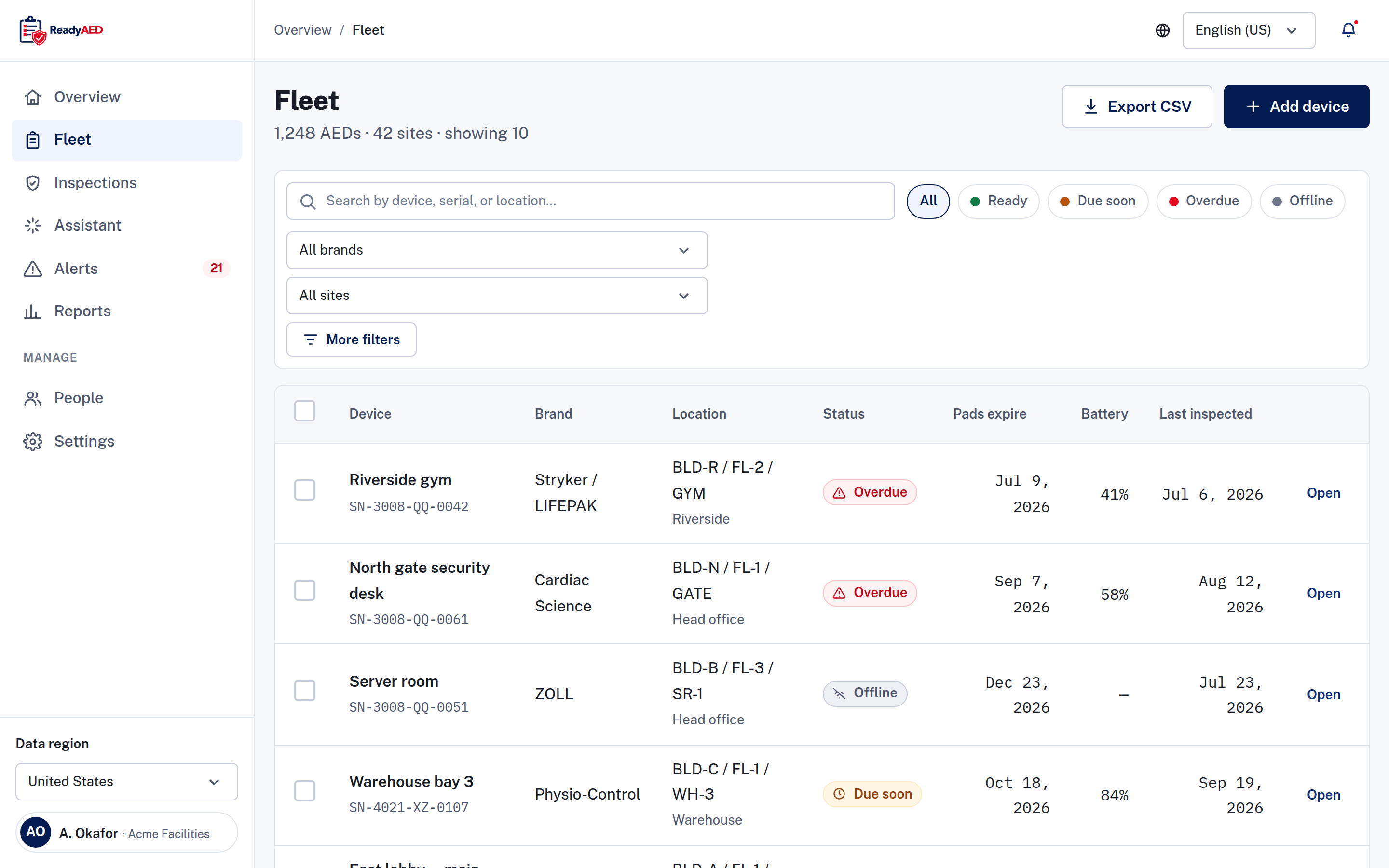
A mixed fleet is an AED program with units from more than one brand. The register keeps every unit in one list. Mixed fleet covers the register, the Brand column and the filter by brand or site.
On data out, the line is clear. ReadyAED does not read data from the Stryker device connection, and company SSO is the only integration shown in the product today. Exports are report, CSV and device history. REST API, webhooks and HRIS or EHS integrations are not confirmed yet: product confirmation of REST API, webhooks and HRIS/EHS integrations, with named systems.
Moving from LIFELINKcentral to ReadyAED
A records move, not a device move.
Your Stryker devices stay, and any ProCare arrangement stays with Stryker.
Before the move, list the devices the service plan covers, so the register and the service list start from the same unit count. Keep one owner for the register, and agree which records must stay in the old system for audit.
- Keep LIFELINKcentral and any ProCare arrangement running. Do not cancel anything on the strength of this page.
- Add each Stryker or LIFEPAK unit to ReadyAED by hand. Bulk import is not confirmed: confirmation of bulk import or migration tooling.
- Enter what the LIFELINKcentral record holds for the unit: brand, model, serial number, asset ID, site, location, pads expiry and battery reading.
- Upload the manuals and service records that belong to each Stryker device.
- Run the first inspections from ReadyAED and make sure that the register matches the LIFELINKcentral list.
- When every line matches, retire the old record after your next audit. Decide separately about the service plan.
When to choose LIFELINKcentral
Choose LIFELINKcentral if your fleet is Stryker, if you want remote monitoring through the manufacturer's own device connection, and if a managed program with implementation support and post-event review suits your team. Choose LIFELINKcentral if you want fire extinguisher and medical kit tracking in the same place as the AEDs.
Choose ReadyAED if the fleet holds more than one brand, if you want a software-only purchase with one flat rate, or if you want no paid-license footnote on the feature list. Both answers are reasonable. The right answer follows the fleet and the support model you want.
Questions facility managers ask before a LIFELINKcentral comparison demo
Does ReadyAED work with Stryker and LIFEPAK AEDs?
Yes. ReadyAED keeps one register for AEDs of any brand. A Stryker or LIFEPAK unit holds the same fields as every other unit: brand, model, serial number, asset ID, site, location, status, pads expiry, battery percentage and last inspection date.
Does ReadyAED monitor AEDs remotely?
No. ReadyAED is software only, with no hardware and no telemetry. The Offline state means that no report was received, and your team confirms the device during the next inspection. Remote monitoring for Stryker AEDs is a LIFELINKcentral feature and runs on the Stryker device connection.
Can we keep our ProCare service plan?
Yes. ReadyAED sells no hardware and no consumables, so your device and service arrangements stay where they are. ReadyAED adds the register, the inspections and the records.
How do we move from LIFELINKcentral?
Keep LIFELINKcentral running while you add devices to ReadyAED. The Fleet screen adds one device at a time, and bulk import is not confirmed: confirmation of bulk import or migration tooling. Retire the old record when every line matches.
What does ReadyAED charge?
ReadyAED charges one flat rate for the software, not per device. The rate is approved price. ProCare and any Stryker monitoring stay outside that price.
Where did the LIFELINKcentral facts on this page come from?
Every LIFELINKcentral fact cites the Stryker product page, last verified 23 September 2026. If Stryker changes the page, we make sure that the facts still hold and update the date. If a fact cannot be confirmed at the Stryker page, we mark it instead of publishing it.
ReadyAED vs LIFELINKcentral: what happens to the map view?
The map view comes with LIFELINKcentral. ReadyAED shows the fleet as a register with a site filter, and each device carries a site and a location path. If the map is central to your daily work, compare that view before you move.
Does the page show customer proof?
The page presents features and services rather than customer stories. Ask Stryker for a reference from a program like yours if proof matters to your decision.
Bring your Stryker fleet, or a mixed fleet
We show how one register holds every unit, how the four states read and where the records live.
One flat rate covers the register for your Stryker units and every other brand. See Pricing for the commercial model and run your own numbers in the ROI calculator.