AED program management software for every brand
One register for every AED, phone-first inspections and audit-ready records. ReadyAED is software only.
An AED (automated external defibrillator) is a device your team must keep ready. An AED program is the work around those devices: inspections, pads, batteries, records and proof for an auditor. ReadyAED is AED program management software.
ReadyAED keeps the program in one place, for the people who run it: facility managers, safety teams and compliance officers. Add every AED, whatever the brand.
Your team inspects from a phone. The records stay in the register.
One register, every brand
One table for every AED, whatever the brand.
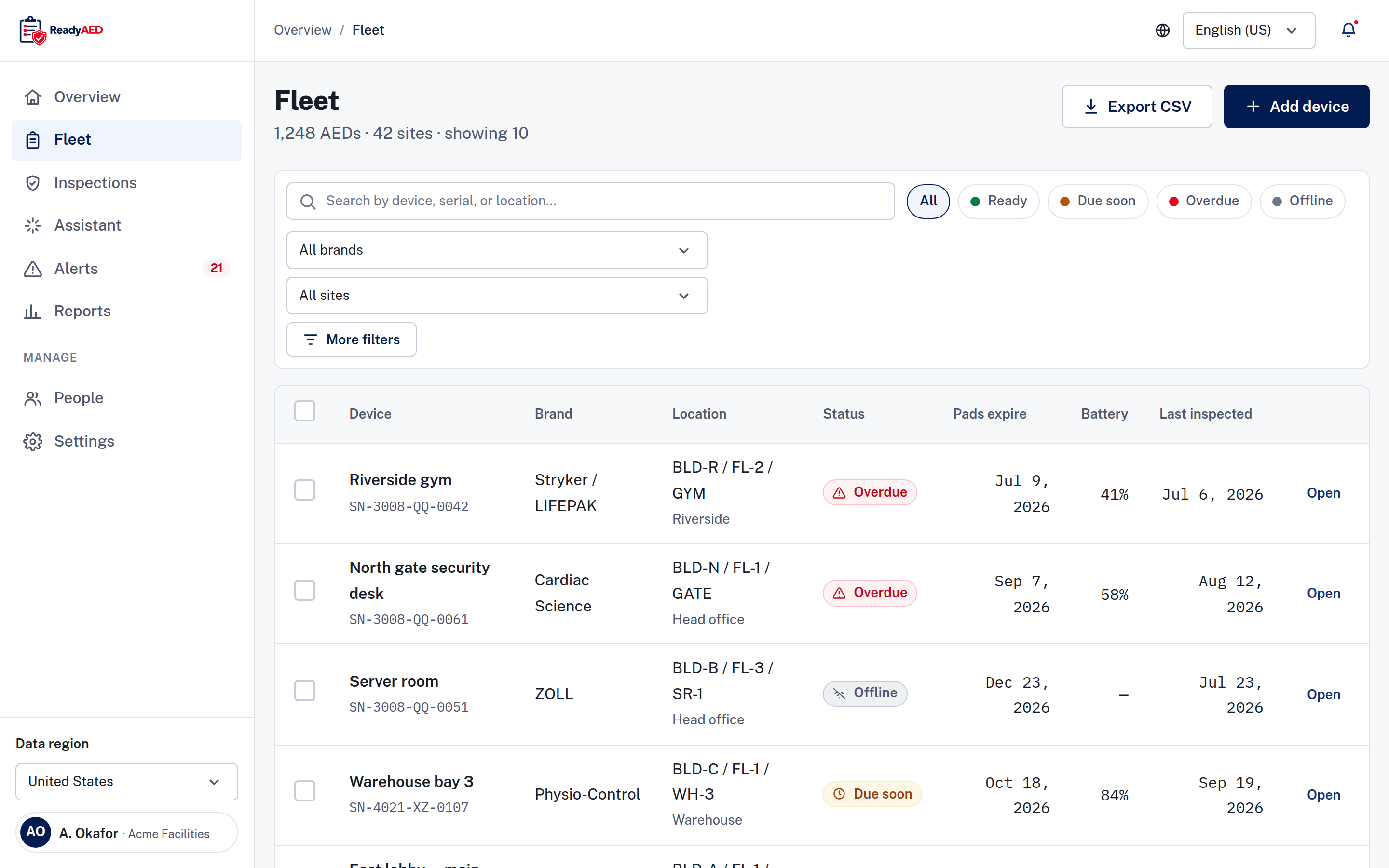
ReadyAED is hardware-agnostic. It keeps one register for AEDs of any brand, so a mixed fleet does not live in separate spreadsheets. You record the brand and the model, and the register treats every unit the same way.
Each row shows the serial number, the location path, the site, the status, the pads expiry, the battery percentage and the last inspection date. Filter the register by status, brand or site. Search by device, serial number or location.
Select rows to assign an inspection, reorder pads or export the list.
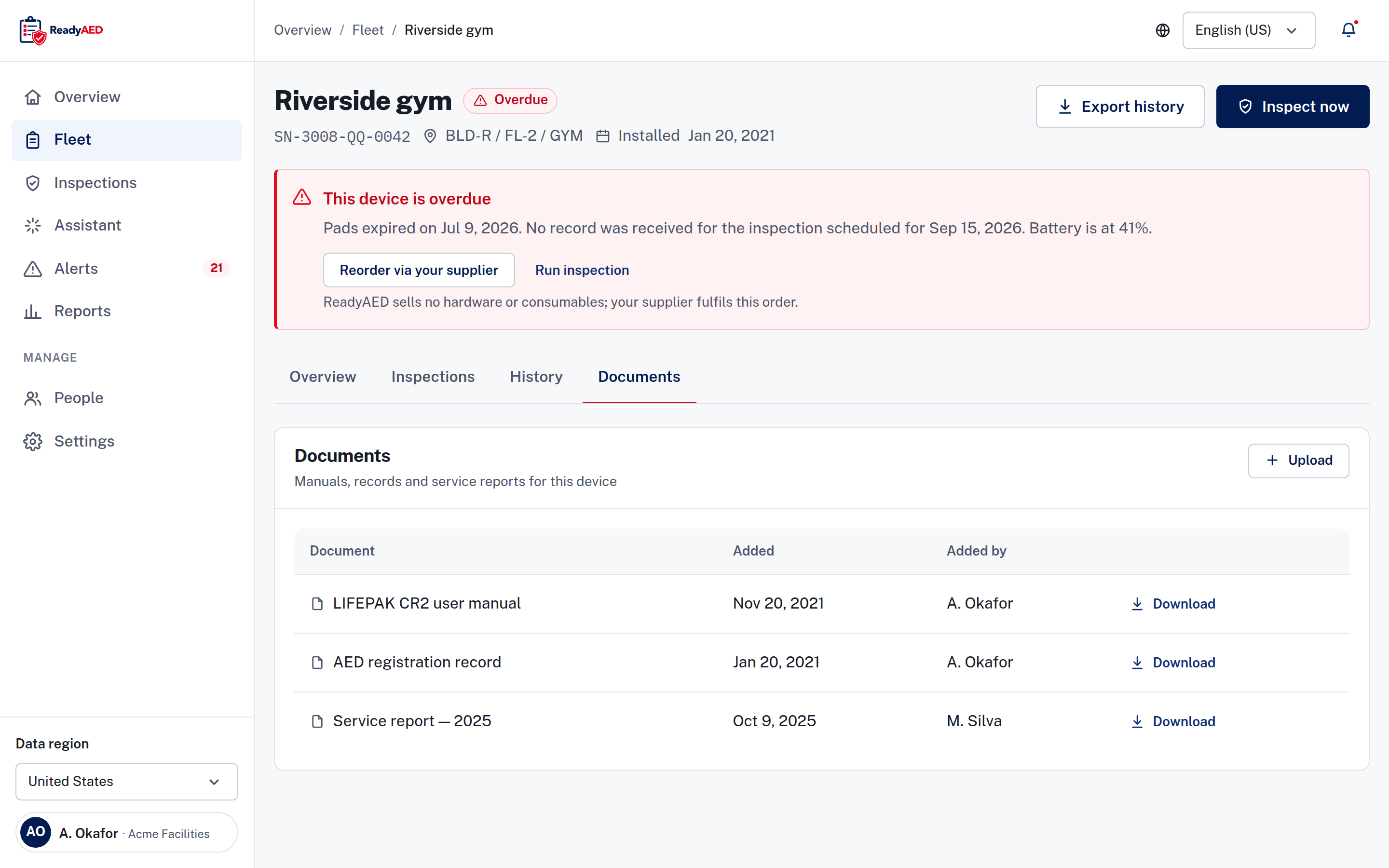
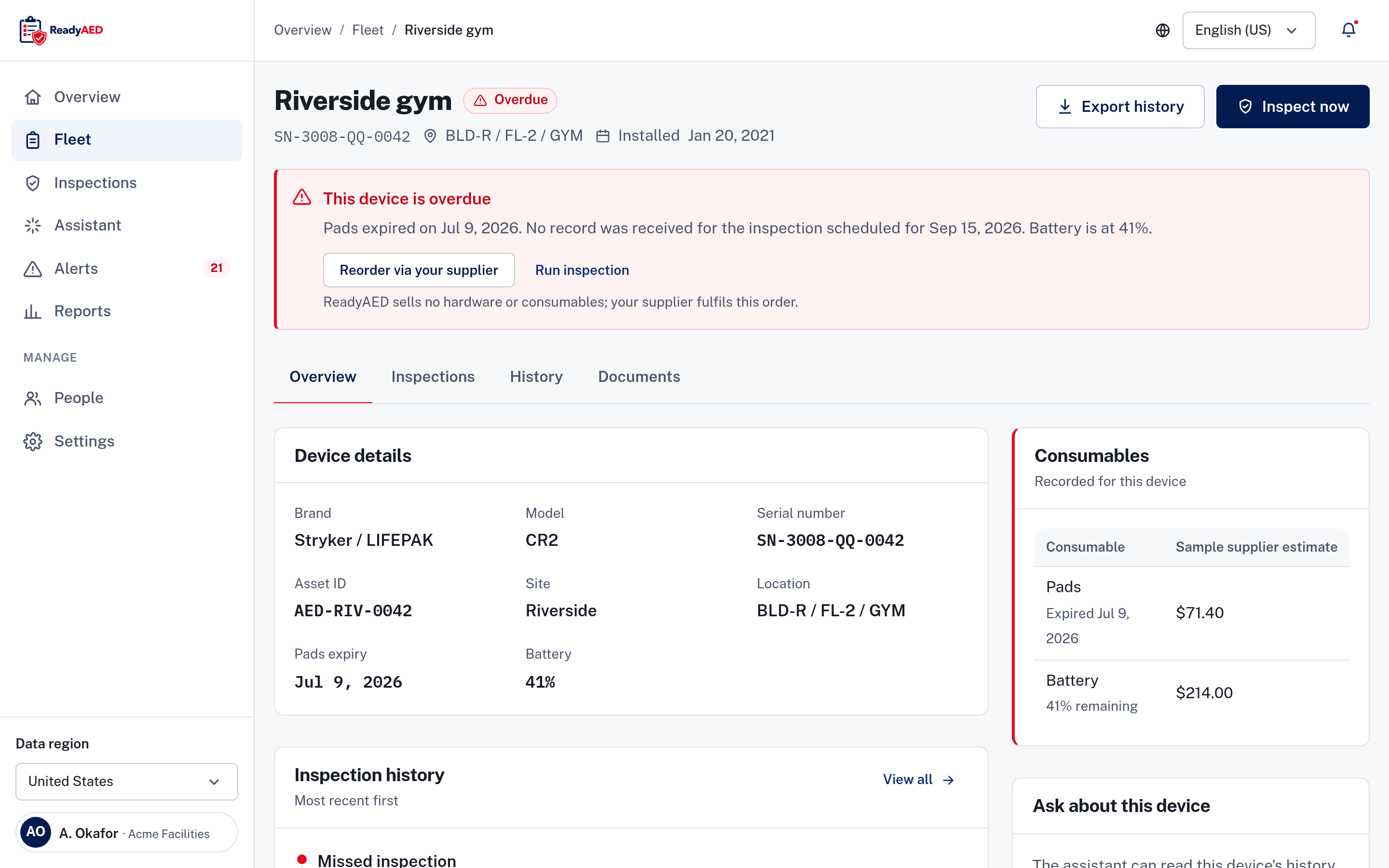
Open a device to see its full record: the facts, the inspection history, the event history, the documents, the assigned custodian and the last inspector. A device that needs attention shows the reason and two actions: order replacement pads or run an inspection. Partners fulfill the order, and ReadyAED sells no hardware and no consumables.
A printable QR code on each device opens its record when you scan it. One status model runs through the register: Ready, Due soon, Overdue and Offline. Every status carries an icon and a word, so it reads the same in the app, in email and on a printed report.
The four surfaces
The whole product, on one scroll.
ReadyAED covers four parts of the program. Use the tabs to see what each part does.
Dashboard
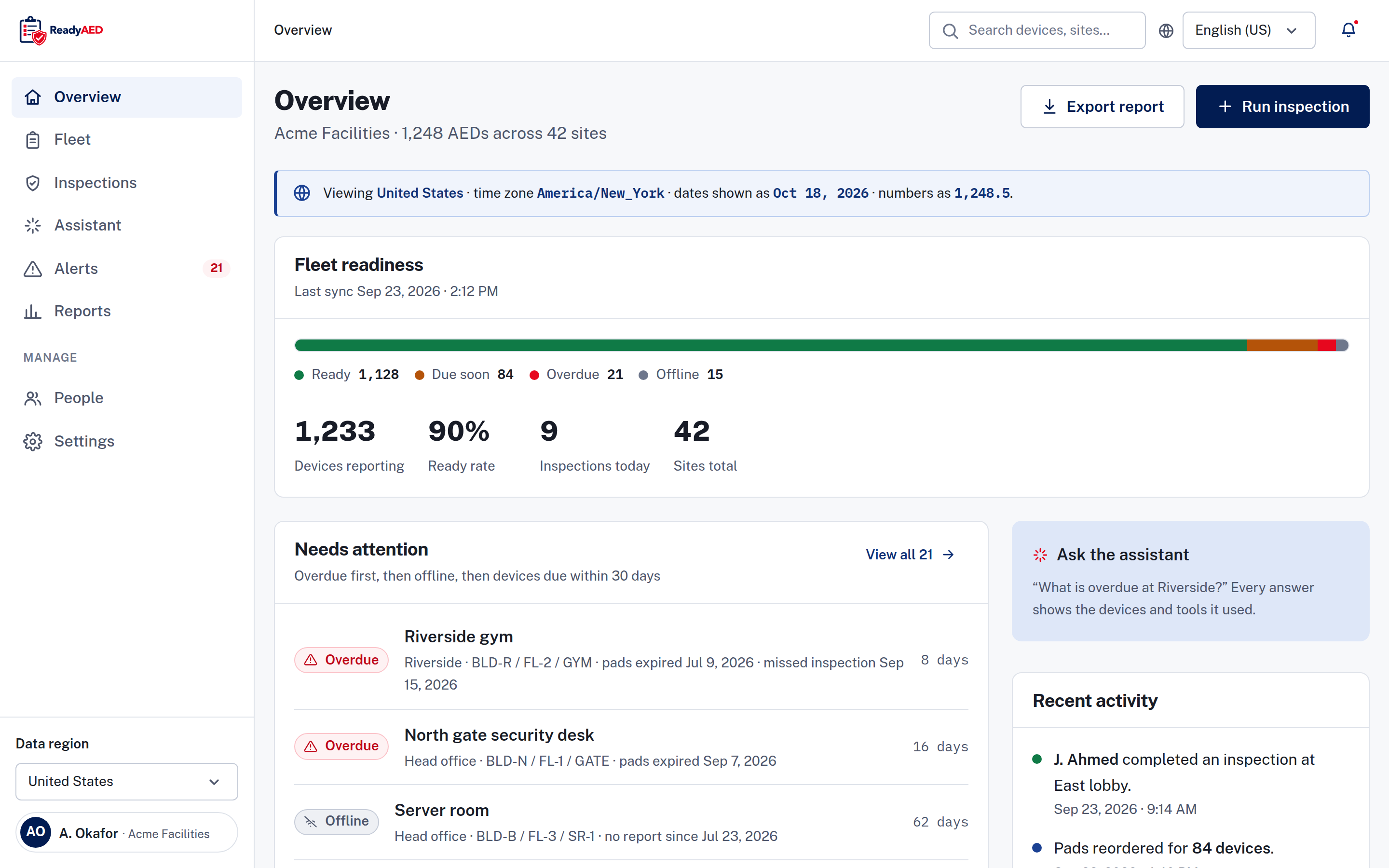
The Overview screen shows the state of the whole program. The readiness meter counts the devices in each of the four states. Ready means the unit is inspected, in date and reachable.
Due soon means an inspection or a pad/battery expiry date falls within the next 30 days. Overdue means a pad or a battery is past its date, or the team missed an inspection. Offline means no report was received, so you check the device. what generates a device report, the Offline state and the device-used notification
The KPI strip shows devices reporting, the ready rate, inspections today and sites total. The Needs attention list puts overdue units first, then offline devices, then devices due within 30 days. Each row shows the device, its location path, its site and the days left.
A consumables table lists the pads, batteries and rescue kits that expire in the next 90 days. The table shows the devices affected and the reorder cost. You can create a purchase order in the app.
Partners fulfill the order. ReadyAED sells no hardware and no consumables.
A recent activity feed lists the actor, the event and the time, with a link to the full audit log. Site staff are invited into the account. Run an inspection or export a report from the Overview screen.
An alerts bell shows an unread count. The Overview screen is also the entry point to the assistant.
The assistant is read-only. It answers from your devices and lists the queries behind each answer.
See the Readiness dashboard page for this screen in full.
Mobile inspections
Your team inspects each AED from a phone. The flow works in the browser on Android and iOS phones, so there is nothing to install.
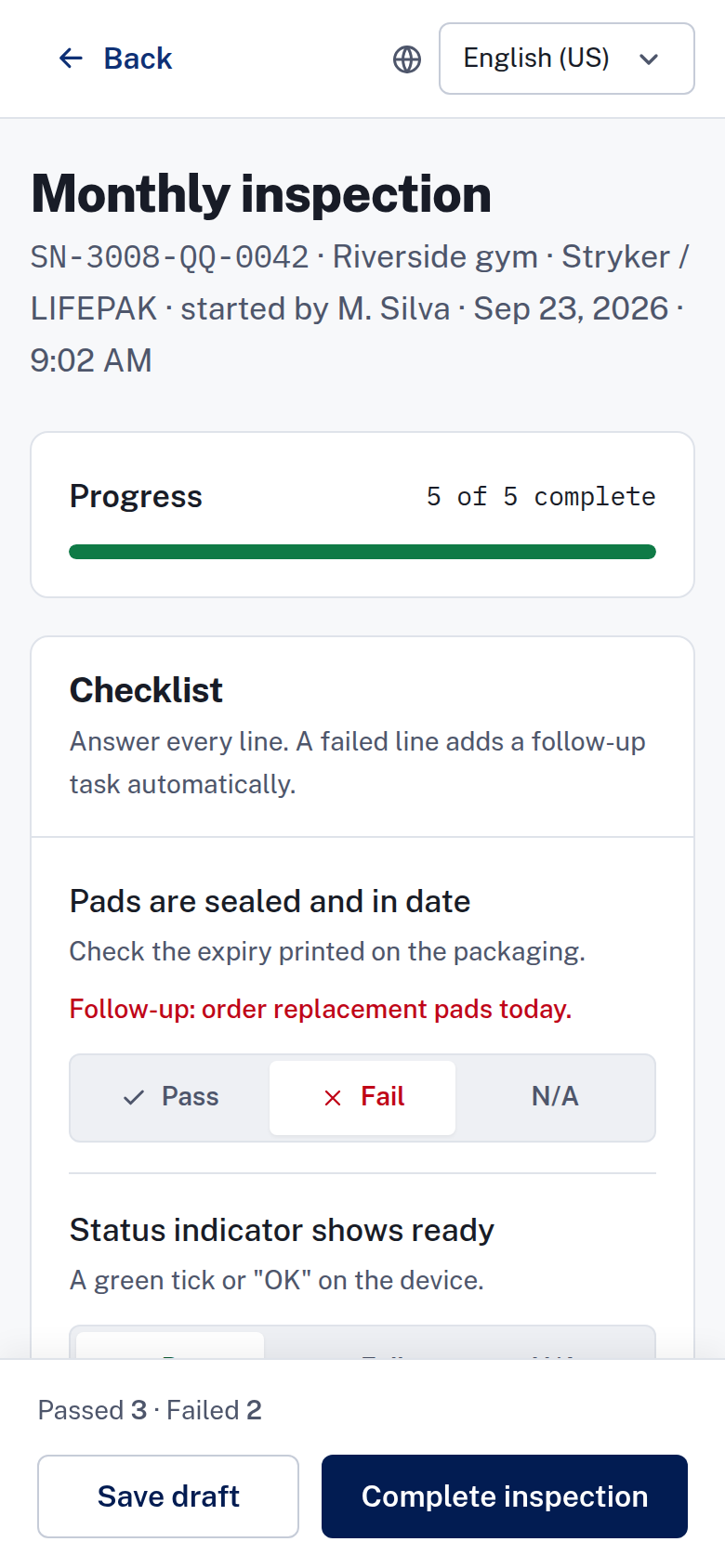
The inspection screen uses a focused shell with no sidebar. Five checklist lines cover the work:
- Pads sealed and in date.
- Status indicator shows ready.
- Battery within range.
- Cabinet unlocked and unobstructed.
- Rescue kit sealed and complete.
Answer each line Pass, Fail or N/A. Every line must be answered before the inspection is complete. A failed line adds a follow-up task automatically, for example an order for replacement pads or a service request.
Notes and photos are optional. Photos can be JPG or PNG files with a 10 MB limit, from the camera or the photo library. The screen shows a progress bar, the passed and failed counts, a save-draft action and the complete action.
You can save a draft and complete the inspection later. ReadyAED schedules inspections, and the device timeline records a missed inspection.
See the Mobile inspections page for the flow in full.
Compliance
ReadyAED records every inspection: the date, the inspector, the checklist answers, the result, the battery reading, the notes and the photos. The device record keeps the inspection history as a timeline and as a table, with passed, passed with note and missed results. The event history keeps automatic status changes and location updates.
You upload manuals, certificates and service records to the device and download them again. The record shows the assigned custodian and the last inspector. An audit trail records user and system events, device history and inspection history.
Export a report, a CSV file or the device history when someone asks for proof.
See the Compliance automation page for records and exports.
Medical direction is delivered through licensed physician partners. ReadyAED does not practice medicine. named medical-direction partners and the markets they cover
Compliance depends on your state and your program. legal-approved disclaimer text this passage needs legal sign-off
Integrations
Sign in with a work email and password, or with company SSO (single sign-on). ReadyAED sends five transactional emails: inspection due, overdue, device used, weekly digest and invite. A data-region selector offers US, UK, EU, India and APAC, and the region is set per site.
Dates, times, numbers and currency format for your locale. The locale selector does not translate the interface text. product confirmation of REST API, webhooks and HRIS/EHS integrations, with named systems
See the Open API & integrations page for the platform details.
How it works
Four steps, from setup to proof.
Here is the loop your team runs.
- Set up the register. Add each AED with its brand, model, serial number, site and location.
- Inspect on a phone. Your team answers the five checklist lines and completes the inspection.
- Act on what the software flags. ReadyAED shows overdue units, expiring pads and offline devices on the Needs attention list.
- Keep the proof. Every inspection and event goes to the device history and the audit trail.
The full walkthrough, with a screenshot for each step, is on the How it works page.
Outcomes
What changes for the program.
Your program lives in one place. Every AED, every brand and every site share one register and one status model. You can see the whole estate from one screen.
Work moves to the phone: inspections happen where the AED hangs, and a failed line becomes a follow-up task. Expiry is visible in advance: the consumables view looks 90 days ahead and shows the reorder cost. Records stay together: the audit trail, the device history and the inspection history stay with the unit, and exports are ready when an auditor asks.
ReadyAED is an AED readiness platform. It charges one flat rate for the software. approved price See Pricing.
Book a demo
See the register, the inspections and the records.
Book a demo. We will show you the register, the inspection flow and the records, and we will answer your questions about your fleet.
The demo covers what the software costs, how your data is handled and why a mixed fleet needs one register. Want to read first? See Pricing, the Security & Trust Center or Why ReadyAED.
You can also explore the Features hub at your own pace.