ReadyAED

An AED program for facility managers: one register for every site

You keep every AED ready, plan the checks and hold the records. ReadyAED keeps the register, the inspections and the history in one place.

You answer for the AEDs in your buildings. The job has three parts: keep every unit ready, schedule the checks and hold the records. This page is for the facility and safety managers who do that work.

An AED (automated external defibrillator) can fail because a pad is past its date or a battery is flat. A register is one list that holds every unit and its status. ReadyAED keeps that register, and your team works from it.

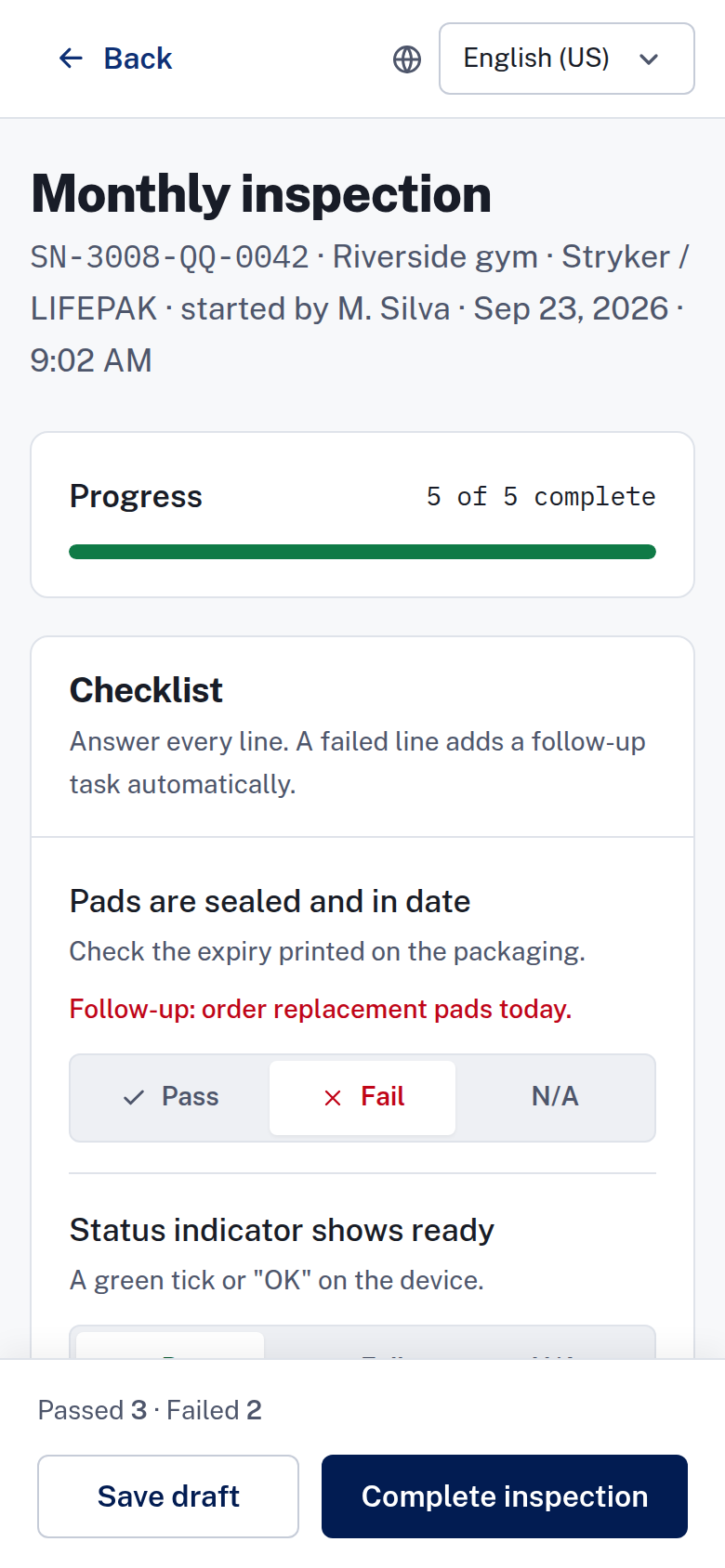
Phone inspection screen with sample data, showing five checklist lines answered and a follow-up task on the failed pads line.

KPIs for facility managers

KPIs are the numbers you report on the program.

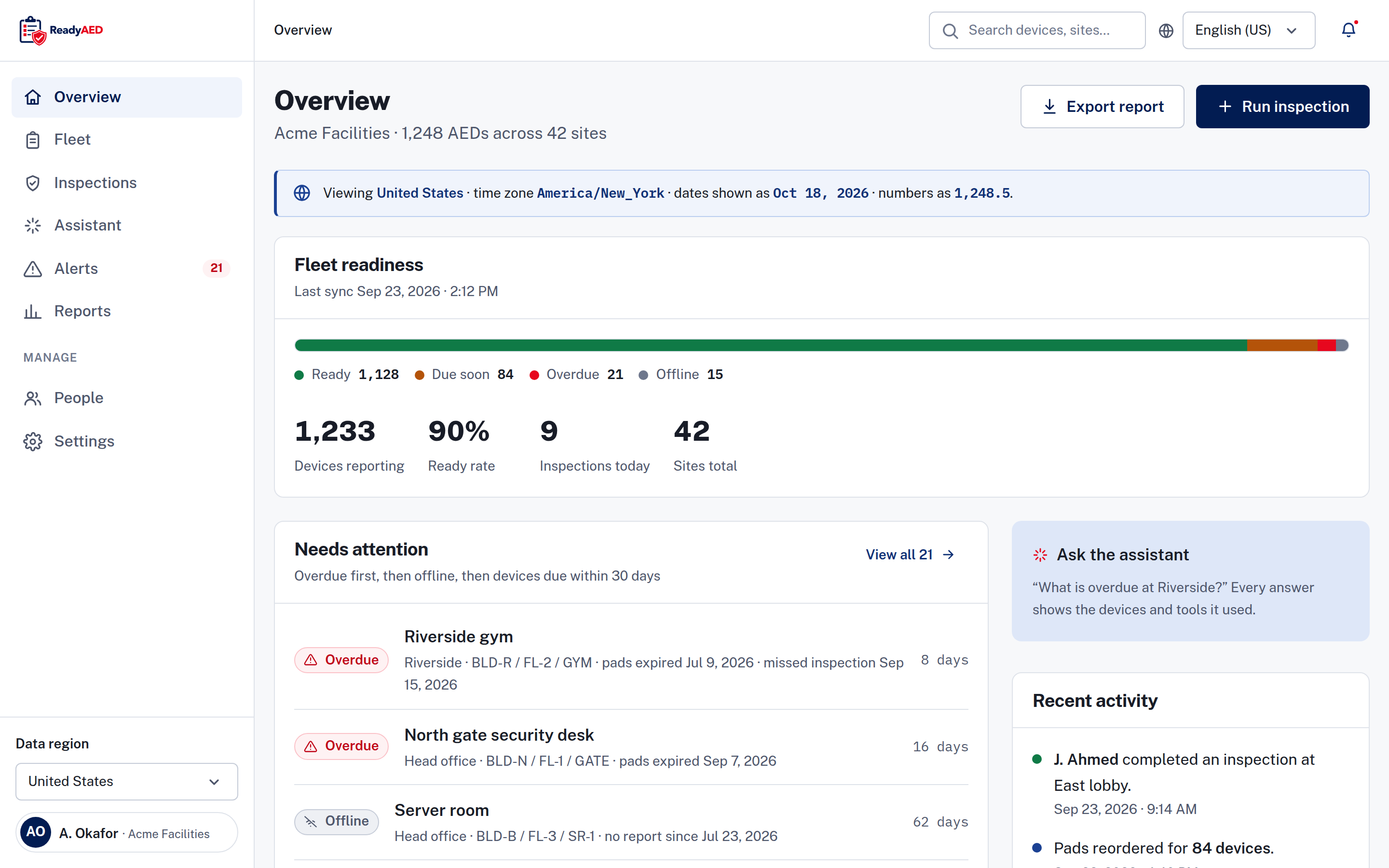
Fleet overview with a readiness meter, a needs attention list and a recent activity feed, showing sample data.

Every AED is on the list

Coverage is the first number. Every AED your organization owns sits in one register with its site and its location path. A location path is the building, floor and room where the unit hangs. A unit that is missing from the register is a unit nobody checks.

Ready, due, overdue or offline

The register uses four states: Ready, Due soon, Overdue and Offline. Due soon means the unit is due within 30 days. Offline means no report was received, so someone must check the device. The summary shows the count and share of devices in each state, and the needs attention list puts overdue units first. Every state carries an icon and a word, so colour is never the only signal. The device record shows the pads expiry, the battery percentage and the last inspection date.

Ready Due soon Overdue Offline

Checks that close on time

Your team inspects each unit from a phone. Five checklist lines cover the pads, the status indicator, the battery, the cabinet and the rescue kit. When a line fails, ReadyAED adds a follow-up task, such as ordering pads or clearing an obstruction. The task stays visible after the inspection ends.

Records that answer a question

An audit trail records user and system events. Device history and inspection history stay with the device. When a site lead or an auditor asks for the record of one unit, you open one page instead of four files.

Your daily reality

The work spreads over several buildings

Your day moves between buildings. A lobby unit, a warehouse unit and a gym unit each have a pads date, a battery reading and a cabinet. Each one needs a check and a record. The register holds them in one list, with the site and the location path on every line.

One person holds the schedule

When one coordinator keeps the tracker, the program depends on that person. A holiday or a handover breaks the schedule. Nobody else can say which unit is due next. One register, with a site custodian (the person who looks after the units at that site) on each site, keeps the schedule with the program instead of with one person.

The record arrives late

A paper sheet records a check when someone remembers it. A missed check leaves no trace until a review asks for it. Then the search starts across binders, spreadsheets and email. An inspection recorded in the register leaves a dated entry with the inspector, the result and the notes.

Your team works from one register

Each inspector opens the device on a phone and answers the checklist. ReadyAED records the result and shows the next due date. The register keeps every site in one list. You filter by site when you need one building. You can export the list as a CSV (comma-separated values) file for anyone who needs it in a spreadsheet.

Features that matter

Mobile inspections

Five checklist lines on one phone-first screen. Your team installs nothing, because the flow works in the browser on Android and iOS phones. An inspector can save a draft and complete it later. Notes and photos are optional. Mobile inspections covers the checklist and the flow.

Readiness dashboard

One status model for every unit, with a register summary and a needs attention list that puts overdue units first. Readiness dashboard covers the states, the filters and the device record.

Expiry & consumables tracking

A 90-day view of pads, batteries and rescue kits, with the devices affected and a reorder action. Partners fulfil the order, because ReadyAED sells no consumables. Expiry & consumables tracking covers the dates and the reorder flow.

What is proven, and what is not

What we can show today

One register for AEDs of any brand. Each line holds the serial number, site, location path, status, pads expiry, battery percentage and last inspection date. Search by device, serial number or location, and filter by status, brand or site. Bulk actions work on selected rows: assign an inspection, reorder pads or export the list.

ReadyAED is software only. It does not sell or make AEDs, pads, batteries or cabinets. It does not replace your emergency plan, your trained responders or your supplier.

What still needs approval

Fleet scale and customer proof are not approved yet, so we mark the gaps instead of filling them with estimates.

  • approved units under management and site counts
  • customer quote and name — needs written customer approval
  • customer logo wall — needs approved customers

FAQ: questions facility managers ask before a demo

We manage AEDs across several buildings. Does one register cover them all?

Yes. The register holds every unit with its site and its location path. Filter by site to work on one building, or search the whole register by device, serial number or location. The overview shows the total number of sites.

What does an inspection look like for my team?

An inspector opens the device on a phone and answers five checklist lines. The lines are pads sealed and in date, status indicator ready, battery in range, cabinet unlocked and unobstructed, and rescue kit sealed and complete. Each line takes Pass, Fail or Not applicable (N/A), and every line must be answered before the inspection is complete. A failed line adds a follow-up task, and notes and photos are optional.

Do we need to replace our AEDs or buy pads from ReadyAED?

No. ReadyAED is software only. It does not sell or make AEDs, pads, batteries or cabinets. Partners fulfil consumables, and you can create a purchase order in the app. The device alert links to a reorder action when pads are due.

Can we import the spreadsheet we use today?

ReadyAED adds devices one at a time today. Bulk import and migration tooling are not confirmed: confirmation of bulk import or migration tooling. Each device record starts with the facts you enter, and the inspection history builds from there.

How do we show that the checks happened?

An audit trail records user and system events. Each device keeps its inspection history and its documents, such as manuals, certificates and service records. You can export a report, a CSV file or a device history when someone asks for evidence.

Book a demo

Bring your register to the demo. We show how one register holds every site, how the four states read and how the records stay with each device.

ReadyAED charges one flat rate for the software. The price is approved price. See Pricing for the commercial model, and find the other roles on the Solutions hub.