ReadyAED

Mixed fleet AED management: one register for every brand

Keep AEDs from every brand in one register, with one status model and one record per device.

A mixed fleet is an AED (automated external defibrillator) program with units from more than one brand. A register is one list that holds every unit and its status.

The fleet grows one purchase at a time. A new building adds a second brand, and a replacement adds a third. ReadyAED keeps one register for AEDs of any brand. Every device line holds the brand, serial number, location and status. You open one table and see the whole fleet.

For why fleets mix and what the split lists cost, read AEDs from different brands in one register.

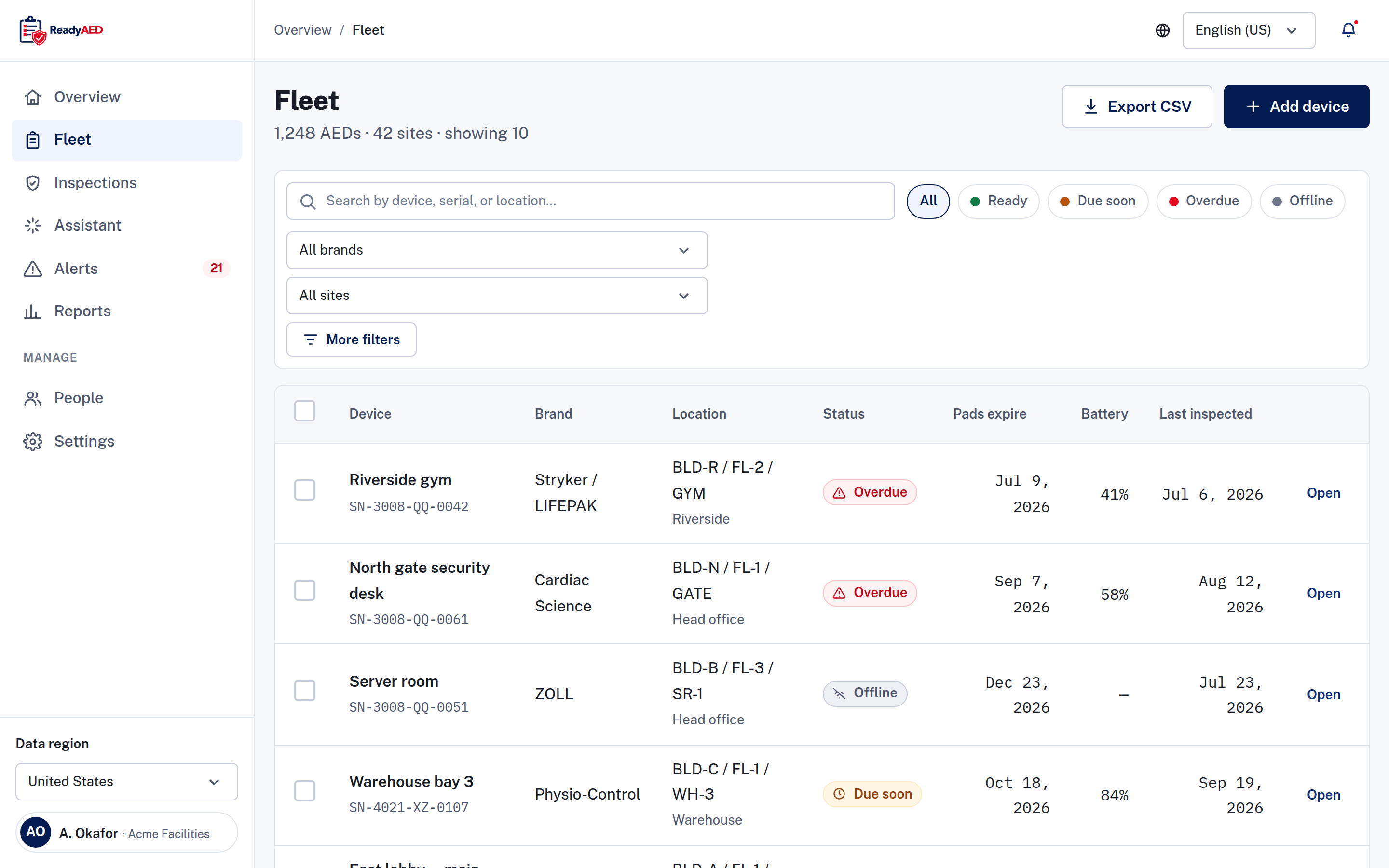
Fleet register with sample data, showing a Brand column and rows for Stryker / LIFEPAK, Cardiac Science, ZOLL and Physio-Control AEDs, with Overdue, Offline and Due soon statuses.

One fleet, many records, no single view

The register splits by brand

A mixed fleet rarely arrives in one order. Each purchase brings its own report and its own form. Some units then live in a spreadsheet, some in a binder and some in an email thread. The coordinator becomes the only person who knows where each record sits.
The gaps hide until inspection day

If a unit is missing from the register, nobody sees its pads date, its battery level or its last inspection. The gap appears at the next inspection or audit, when someone must prove the unit was checked. A site lead asks for the record of one unit, and the answer sits in more than one file.

Mixed equipment adds friction at the cabinet. Inspectors meet different status lights, different pad packaging and different cabinet designs. A checklist that fits one model does not fit the next.

One person carries the program

When one coordinator owns the spreadsheet, the program depends on that person. A handover or a departure breaks the schedule, and nobody else can say which unit is due next.

What the role needs

An EHS (environment, health and safety) or operations leader needs one view of the fleet. That view must answer three questions: which units are ready, which are due and which need action now. It must cover every brand and every site without a separate file for each supplier.

How it works

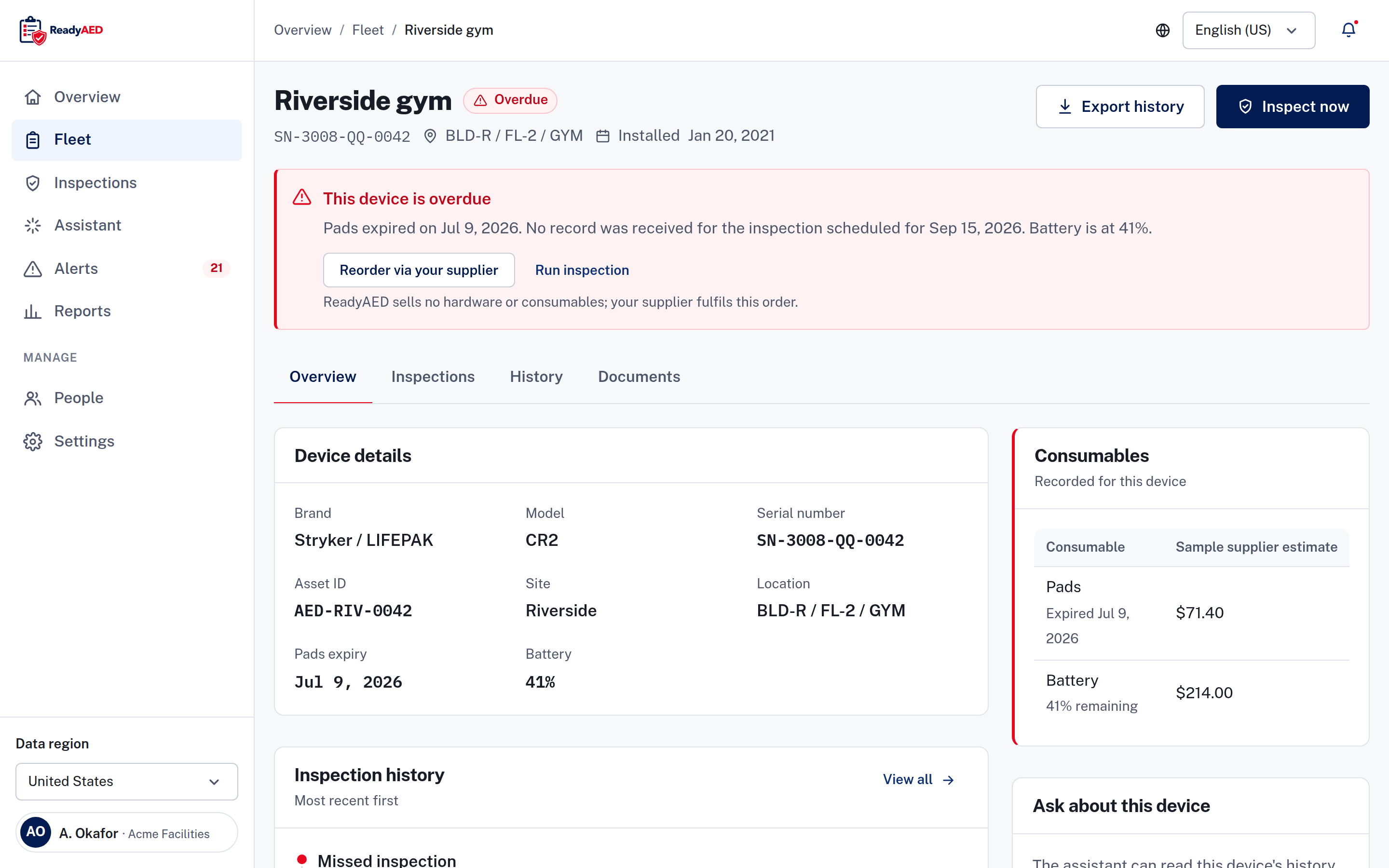
Device record with sample data, showing the brand, model, serial number, location and status of one AED, with an alert that gives the reason and two actions.

Add each unit once

You add a device and record its brand, model, serial number, asset ID (your own reference for the unit) and location. ReadyAED keeps the same fields for every brand, so the register holds its shape as the fleet grows.

One table, one status model

Every unit sits in the same table, whatever the brand, with a Brand column and the same fields on each line: serial number, site, location, status, pads expiry, battery percentage and last inspection date. Filter by brand to see one brand at a time across the fleet.

The register uses four states: Ready, Due soon, Overdue and Offline. They work the same way for every brand, and every state carries an icon and a word. Readiness dashboard covers the states, the filters and the device record.

Ready Due soon Overdue Offline

One inspection checklist for every brand

The same five-line checklist applies to every unit in the register, whatever brand is on the cabinet, and a failed line adds a follow-up task. Mobile inspections covers the checklist and the inspection flow.

Open one device, whichever brand

Open a unit and the record has the same fields, the same history and the same documents, whatever the brand. Your team learns the record once.

When a unit needs attention

An overdue or offline device carries an alert with the reason and two actions: order replacement pads or run an inspection. The pattern is the same for every brand, so the next unit is easier to read. Expiry & consumables tracking covers the dates and the reorder flow.

The register keeps the program visible. It does not replace your emergency plan, your trained responders or your supplier.

What it replaces

The spreadsheet

A spreadsheet shows what someone typed, not what is true now. One column holds the pads date, another holds the inspection date, and the rows drift out of date. When one coordinator owns the file, the program depends on that person.

See vs spreadsheets for the full comparison.

The binder

A binder keeps paper, not a schedule. The inspection sheet for one unit does not show the pads date for another, and each brand brings its own form. Sheets leave the binder for audits and do not always come back.

One register instead

ReadyAED replaces the split record with one register. Every brand gets the same fields, the same four states and the same history. An audit trail records user and system events, device history and inspection history.

Moving from an existing register

If a spreadsheet or another supplier holds your fleet today, keep that record for now. ReadyAED adds devices one at a time.

What is proven, and what is not

What we can show today

Any brand, one register. The device record holds the brand, model, serial number and asset ID, and the register filters by brand and by site. One status model covers the fleet, and every state carries an icon and a word.

ReadyAED is software only. It does not sell or make AEDs, pads, batteries or cabinets.

What still needs approval

Fleet scale and customer proof are not approved yet, so we mark the gaps instead of filling them with estimates.

  • approved units under management and site counts
  • customer quote and name — needs written customer approval

Capturing an expiry date from a photo of the label is not demonstrated yet. product confirmation and screenshot of OCR expiry capture

Manufacturer names in the artwork

The mixed-fleet screenshot shows manufacturer names as plain text. ReadyAED is not affiliated with, endorsed by or sponsored by the manufacturers named in it. All marks belong to their owners. [NEEDS LEGAL REVIEW: manufacturer names as plain text in the mixed-fleet screenshot; /legal/trademarks wording, including the non-affiliation sentence]

Questions EHS and operations leaders ask before a mixed-fleet demo

Can ReadyAED manage a fleet with more than one AED brand?

Yes. ReadyAED keeps one register for AEDs of any brand. The register carries a Brand column, and every line holds the same fields: serial number, site, location, status, pads expiry, battery percentage and last inspection date.

Does every brand get the same fields and the same record?

Yes. A device record holds the brand, model, serial number, asset ID and location, and the record has the same shape for every unit. ReadyAED keeps no separate list per brand.

Does the same checklist cover every AED brand?

Yes. ReadyAED uses one checklist for every unit in the register, whatever brand is on the cabinet, and a failed line adds a follow-up task.

Can I bring in a spreadsheet that lists several brands?

ReadyAED adds devices one at a time today. Bulk import and migration tooling are not confirmed: confirmation of bulk import or migration tooling.

We buy AEDs from several suppliers. Does that work with ReadyAED?

Yes. ReadyAED is software only. It does not sell or make AEDs, pads, batteries or cabinets, so you keep buying from your suppliers. The register holds units from any supplier in one list.

Bring your mixed fleet

We show how one register holds units from several brands, how the four states read and where the records live. ReadyAED charges one flat rate for the fleet. See Pricing for the commercial model and the Features hub for the rest of the product.