ReadyAED

AED software for IT and security teams: sign-in, data regions and records

Review the same facts we publish: sign-in options, the data-region setting and the audit trail. Every unconfirmed control stays a marked gap.

You review the AED (automated external defibrillator) software before it enters your sites. Your questions are about access, data and records, and they arrive before the contract does.

This page states the same facts as the Security & Trust Center. Where a control is not evidenced, we mark the gap instead of claiming the control.

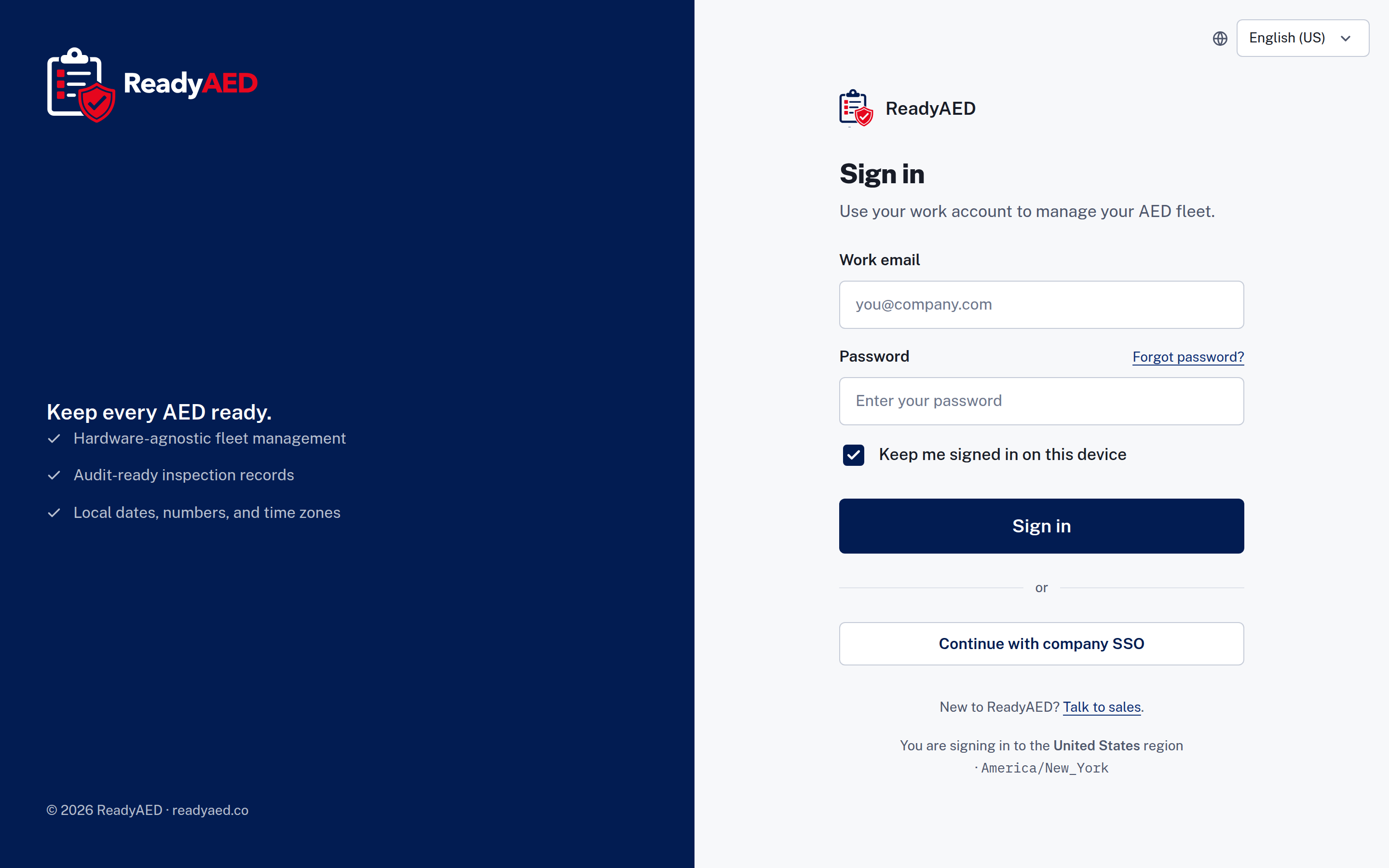
Sign-in screen with a work email field, a password field and a company SSO button.

KPIs for IT and security teams

KPIs are the answers you report to a security review.

Who can sign in

Sign-in uses a work email and a password, with a forgot password link and a keep me signed in option on the device. Company SSO sign-in is shown in the product. Site staff are invited into the account. New organisations are routed to sales, and there is no self-serve signup screen.

Where the data sits

A data-region selector offers five regions: US, UK, EU, India and APAC. The region is set per site, and it is a product setting. Per-tenant residency is not confirmed: confirmation of data residency options

What the record shows

User and system events land in the audit trail. Each device carries its own history. You can export a report, a CSV (comma-separated values) file or a device history for a review or a records request.

What we publish about controls

Security questionnaires ask for controls. We publish only what we can evidence: SOC 2 is in progress, and a BAA (Business Associate Agreement) is available. Evidence for encryption, hosting, backups and penetration testing is not published yet: security controls evidence (encryption, hosting, backups, penetration testing) — product and legal confirmation required

Your daily reality

The review starts with five questions

Who can sign in? Where does the data live? What events are recorded? Can we export the data? What happens when a member of staff leaves? Each answer needs a page you can point to.

The answer must match the evidence

A control list is only useful when every line is true. If a page claims a control the team cannot evidence, the review loses time and the claim comes out. We keep the list short and the status exact.

Access is about people, not devices

Site staff are invited into the account. A device is assigned to a person, and the device record shows a site custodian (the person at the site who looks after the units) and the last inspector. The reviewed product shows no full role and permission model: confirmed role and permission model

What the software does today

Sign-in covers a work email and password, keep me signed in and company SSO. The register is one list that holds every unit and its status. The audit trail and the exports carry the records. The locale switcher formats dates, times, numbers and currency for the reader.

Features that matter

Security & Trust Center

Security overview, compliance status, data handling and the subprocessor, DPA (Data Processing Agreement) and disclosure links. Security & Trust Center states the current position in one place.

HIPAA & data handling

What data the platform handles and how a BAA request works. A BAA is available. HIPAA & data handling covers the detail.

Open API & integrations

The integration list is not confirmed yet: product confirmation of REST API, webhooks and HRIS/EHS integrations, with named systems. Company SSO sign-in is shown in the product today. Open API & integrations covers the API position.

What is proven, and what is not

What we can show today

Company SSO sign-in, work email and password sign-in, forgot password and keep me signed in. A data-region selector with five regions, set per site. An audit trail that records user and system events, plus device history and inspection history. Exports for a report, a CSV file and a device history. SOC 2 is in progress, and a BAA is available.

What still needs approval

Controls and integration facts are not approved yet, so we mark the gaps instead of listing a control we cannot evidence.

  • confirmation of data residency options
  • SOC 2 report date and auditor, when confirmed
  • confirmation of security controls (MFA, encryption)
  • product confirmation of REST API, webhooks and HRIS/EHS integrations, with named systems
  • confirmed role and permission model
  • approved units under management and site counts

FAQ: questions IT and security teams ask before a demo

How do users sign in to ReadyAED?

Sign-in uses a work email and a password, with a forgot password link and a keep me signed in option. Company SSO sign-in is shown in the product. Site staff are invited into the account, and new organisations are routed to sales. There is no self-serve signup screen.

Where does ReadyAED store data?

A data-region selector offers five regions: US, UK, EU, India and APAC. The region is set per site and is a product setting. Per-tenant residency is not confirmed: confirmation of data residency options

Is ReadyAED SOC 2 certified?

SOC 2 is in progress. The report date and the auditor are not confirmed: SOC 2 report date and auditor, when confirmed. We do not claim a certification we do not hold.

Which security controls can we review today?

Today you can review the audit trail, device history, inspection history and the export options. MFA, encryption and other controls are not confirmed: confirmation of security controls (MFA, encryption). The Security & Trust Center states each control and its status.

Does ReadyAED have an API or integrations?

The integration list is not confirmed yet: product confirmation of REST API, webhooks and HRIS/EHS integrations, with named systems. Company SSO sign-in is shown in the product.

Book a demo

Bring your review questions to the demo. We show the sign-in screen, the data-region setting and the audit trail, and we state the position on every control we cannot evidence yet.

Pricing sets out the commercial model, and the Solutions hub lists the other roles.