An AED can fail because a pad is past its date or a battery is flat. A spreadsheet shows the values a person typed. It does not show the state of a unit or the next due date.
Your AED readiness dashboard: every unit and its status in one place
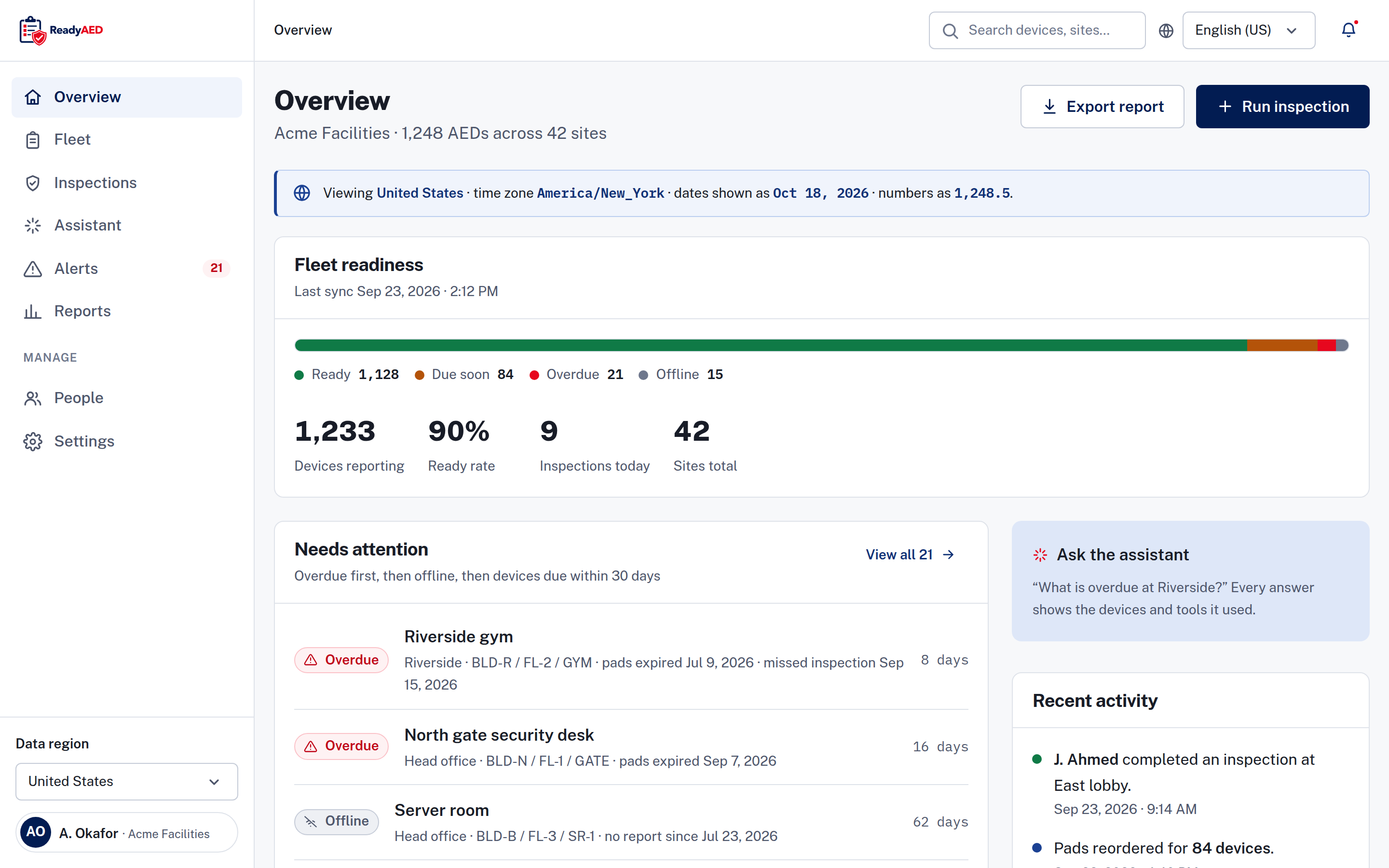
Every AED carries one of four states: Ready, Due soon, Overdue or Offline. Each state appears with an icon and a word.
An AED readiness dashboard is one screen that shows the status of every AED, across every site. You manage AEDs for a facility, a campus or a safety team. You need one clear answer: which units are ready, and which need work? The dashboard puts overdue units first, so your team sees the next task first.
You need three answers: which units are ready, which need work, and who last looked at each unit
A file gives you those answers one row at a time.
Your units sit across buildings, floors and rooms. Records for each site stay in separate files. If your team misses an inspection, nothing flags it.
An inspection round adds another page of notes. The page stays at the site, and the next round starts fresh. No one sees the whole fleet on one screen.
Units change too. A new device arrives, and nobody updates the file. A second brand adds a second list, and the lists drift apart.
How it works
One status model for every unit
Each state has a meaning and an action:
- Ready — the unit passed its last inspection, it is in date and it is reachable. No action.
- Due soon — the unit is due within 30 days. Schedule the inspection or order the part.
- Overdue — the unit is past expiry or missed an inspection. Resolve it now.
- Offline — the platform received no report from the unit. Your team looks at the unit.
Every status chip carries an icon and a word. Status does not rely on colour alone.
The readiness meter and the summary numbers
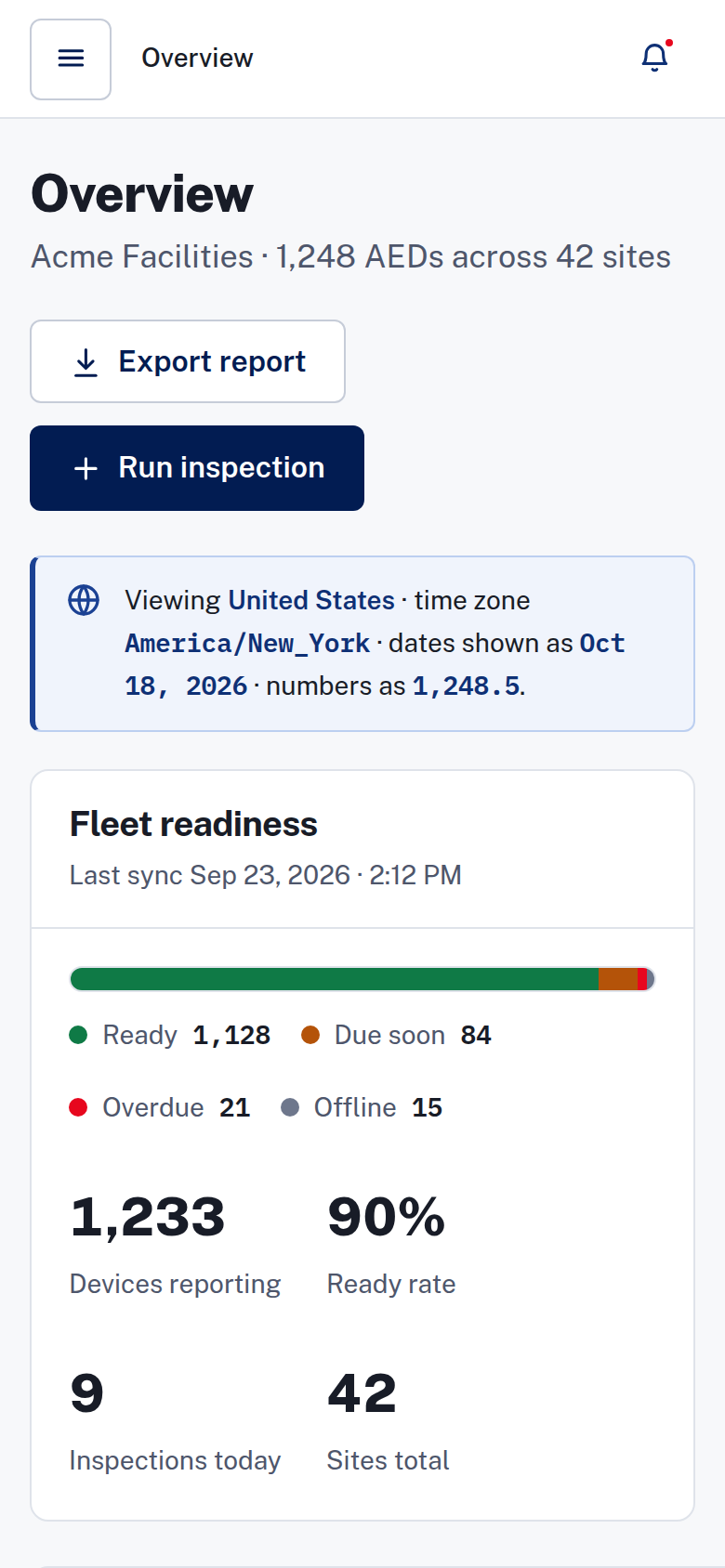
The readiness meter shows the count and the share of devices in each state. A strip of summary numbers shows devices reporting, ready rate, inspections today and sites total.
The needs attention list
The list puts overdue units first, then offline units, then units that are due within 30 days. Each row carries the unit name, the location path, the site and a day count. Your team knows which unit needs work and where it is.
The device record behind each unit
Each unit has a record with the facts: brand, model, serial number, asset ID, site, location, pads expiry and battery. Tabs hold the inspection history, the event history and the documents.
The inspection history lists the date, the inspector, the result and the battery reading. Documents hold your manuals, registration records and service records.
The record names the site custodian and the last inspector. Devices are assigned to a person, and you can invite your site team into the account. A missed scheduled inspection appears on the device timeline.
The expiring consumables table
The expiring consumables table shows each consumable type, the number of devices affected and the next expiry, so you can plan the replacement round.
ReadyAED sells no hardware and no consumables. Fulfilment is by partners.
Expiry & consumables tracking covers pads, batteries and rescue kits.
Records as the work happens
The activity feed shows the actor, the event and the timestamp. It links to the full audit log. An audit trail records user and system events, device history and inspection history.
Filtering the register
The register filters by status, brand or site. Mixed fleet AED management: one register covers the full filter set, search and bulk actions.
Ask the dashboard a question
Ask a question in plain words, for example which devices are overdue. The assistant is read-only, and it cannot change a device. It answers from your devices and lists the queries behind the answer.
On the phone
ReadyAED works in the browser on Android and iOS phones. Your team can open the dashboard from the floor or the hallway, without a desktop. Mobile inspections explains the inspection flow.
What it replaces
Spreadsheets
A spreadsheet holds rows, and a cell holds what a person typed. It does not carry a status for each unit, and it does not put the overdue rows first.
The dashboard shows the state of every unit and lists what needs attention. A missed inspection turns up as an Overdue row, not a blank cell.
Paper binders
A binder stays at one site, and each sheet is a copy. The dashboard covers every site, with a site filter and per-site counts. Inspection history and device history stay with each unit in the record.
One register replaces the file, the binder and the extra list for each brand. Your team reads the same view at every site.
The screenshots on this page come from the product
The values in them are sample data.
What we can show now
- One register for AEDs of any brand, with one status model for four states.
- A site filter, per-site counts and a site custodian for each site.
- An audit trail records user and system events, device history and inspection history.
What we still need to evidence
- Dashboard refresh cadence: product confirmation required before publishing this claim
- Fleet scale: approved units under management and site counts
- Customer proof: customer quote and name — needs written customer approval
FAQ
What is an AED readiness dashboard?
An AED readiness dashboard is one screen that shows the status of every AED, across every site.
What do the readiness meter and the summary numbers show?
The readiness meter shows the count and the share of devices in each state. The summary numbers show devices reporting, ready rate, inspections today and sites total.
How does the dashboard order the needs attention list?
Overdue units come first, then offline units, then units that are due within 30 days. Each row shows the unit, the location path, the site and a day count.
Does the dashboard show counts for each site?
Yes. Each site keeps its own device counts, and the summary numbers include the sites total.
Is the assistant read-only?
Yes. The assistant answers from your devices and lists the queries behind each answer. It cannot change a device.
How current is the dashboard?
The dashboard shows the record held for each unit, including the last inspection result and the latest status change. product confirmation required before publishing this claim
Can I use the dashboard on a phone?
Yes. ReadyAED works in the browser on Android and iOS phones. Your team can open the dashboard from the floor or the hallway.
One dashboard for every AED, every site and every brand
ReadyAED charges one flat rate. The price is approved price. See Pricing for the detail. In a demo, we show the readiness dashboard and answer your questions about your fleet. The Features hub lists the other tools in the platform.