ReadyAED

AED expiry tracking: never be surprised by an expired pad or battery.

One register for every AED. See which consumables (pads, batteries and rescue kits) expire, the devices affected and the reorder cost in your local currency.

ReadyAED is built for facility and safety managers who own the AED program. AED expiry tracking keeps every expiry date for pads, batteries and rescue kits in one register and shows you the devices that need action.

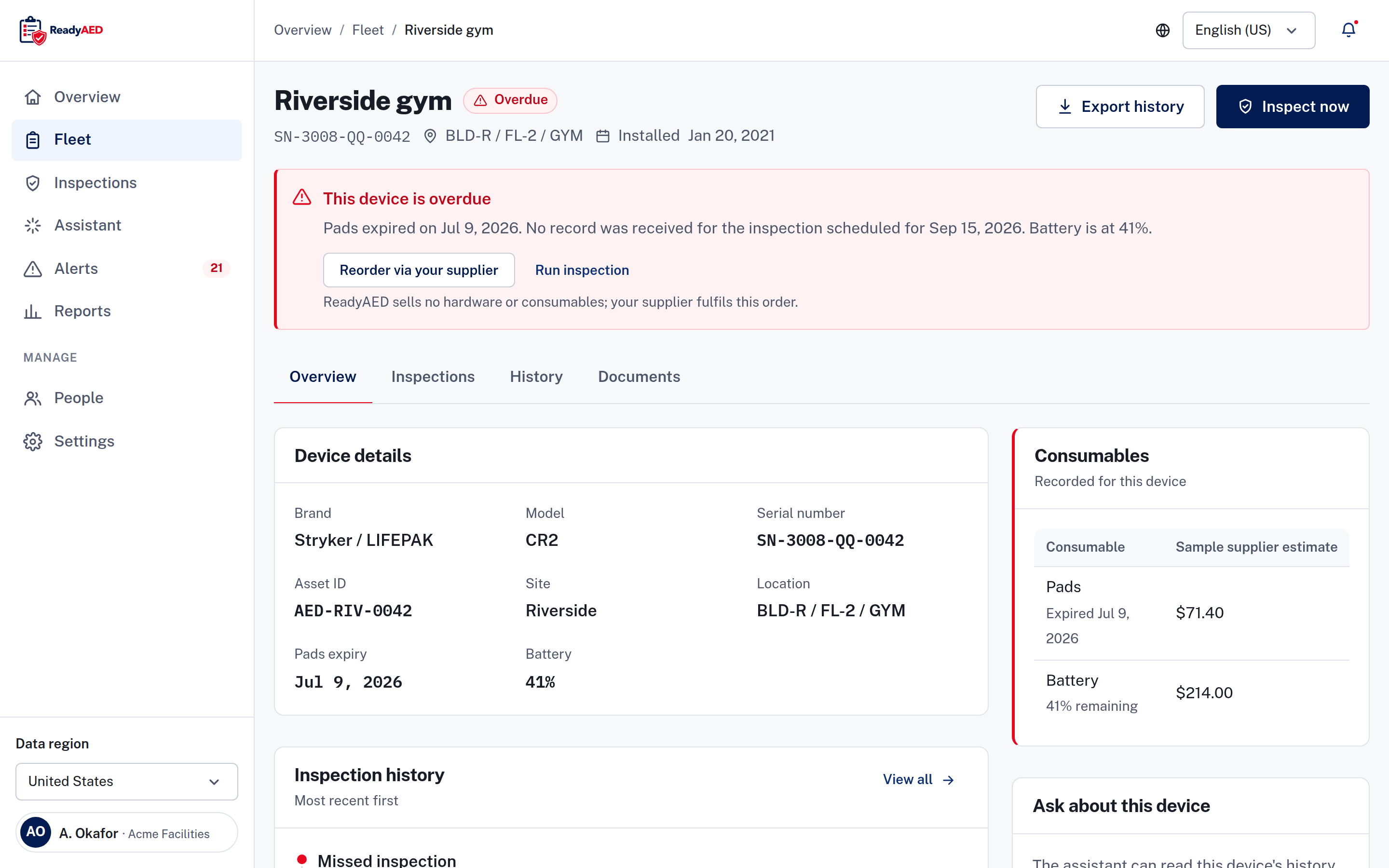
Device record for an overdue AED, showing pads past their expiry date, a battery reading below half and the prompt to reorder replacement pads. ReadyAED sells no hardware or consumables. Your supplier fulfills the order. Sample data.

One missed date can take an AED out of service

An AED (automated external defibrillator) can fail because a pad is past its date or a battery is flat. The unit sits in a cabinet, and the date on the packaging is easy to miss. Pads, batteries and rescue kits each carry their own expiry date.

You keep those dates in a spreadsheet, a binder or a calendar. Each one holds part of the picture:

  • Pads and batteries expire on different dates for each device.
  • Battery readings live in a paper log.
  • Inspection records sit in a binder.
  • A spreadsheet does not remind anyone by itself.

Dates move. A device that was ready last month can be overdue this month. An inspection catches a problem on the day it happens, but it does not watch a date that is still weeks away. When a date passes, no one notices until someone opens the cabinet. Your team then orders a replacement and waits, and the device stays out of service until the new consumable arrives.

People move too. When the person who kept the spreadsheet leaves, the dates leave with them. A shared register does not depend on one person.

Across several sites, the problem grows. Each site keeps its own sheet, and no one sees the whole picture until each site reports. A date that slips at one site stays hidden.

ReadyAED keeps every date in the device record and shows the ones that need action.

From the register to the reorder

Expiry tracking is one part of the software. The Features hub lists the rest.

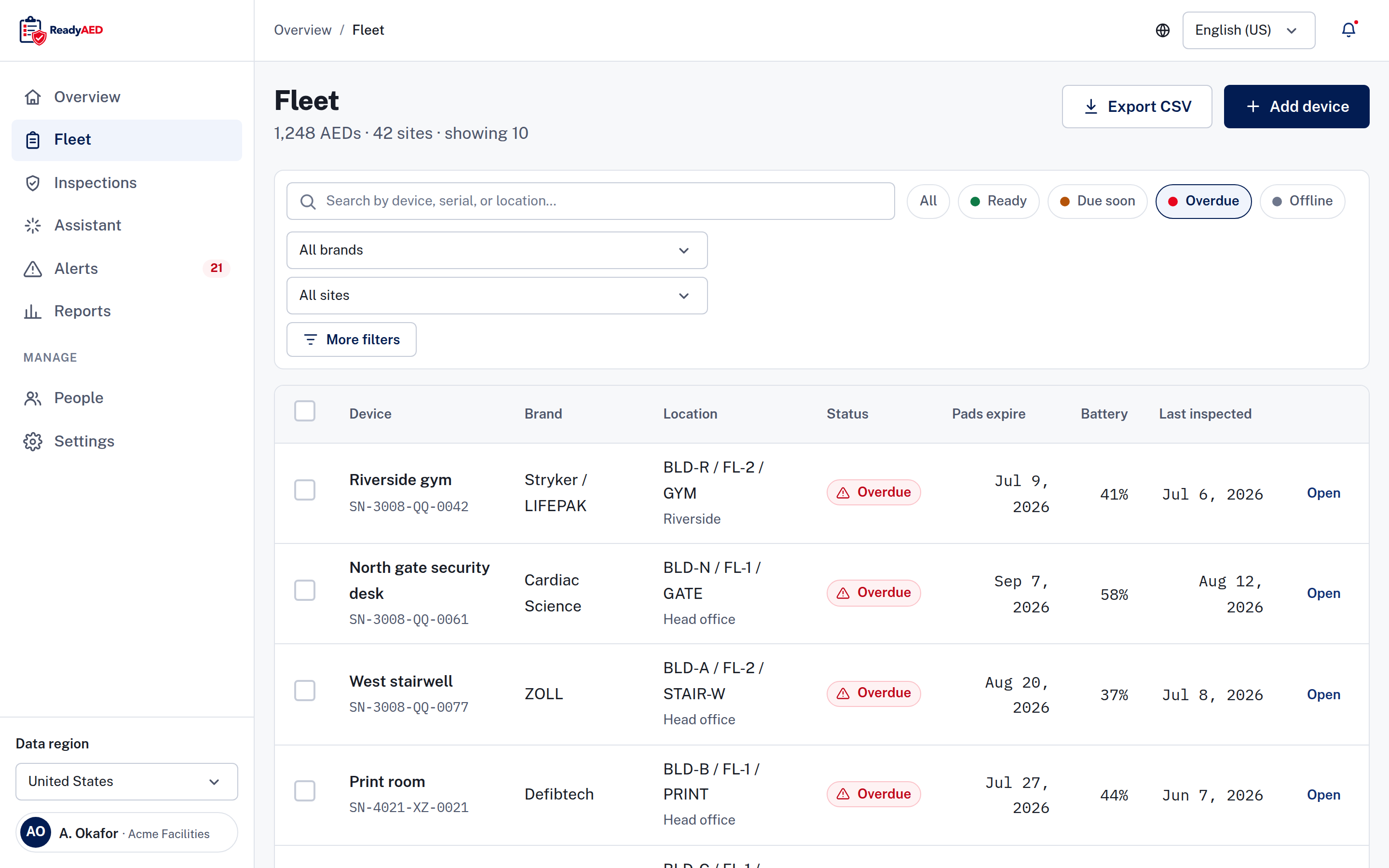
Fleet register filtered to Overdue, showing rows with pads expiry dates, battery readings and last inspection dates.

One register holds every date

The fleet register is the list of every AED in your program. Each device record holds the facts for an expiry check: brand, model, serial number, site, location, pads expiry and battery reading. The location is a path of building, floor and room. Filter by status, brand or site. Search by device, serial or location.

See Mixed-fleet management for how one register covers every AED brand.

Bulk actions on the register let you assign an inspection, reorder pads or export the selection. Each device record also holds the documents, the assigned site custodian and the last inspector. A printable QR code on the device opens the record when someone scans it.

A 90-day view of consumables

The consumables view looks 90 days ahead. It lists each type, the number of devices affected, the next expiry and the reorder cost in your local currency. That gives your team time to order a replacement before a date passes.

Status that shows the next step

Both states carry the next action on the device record. The Readiness dashboard covers all four device states and the needs attention list.

The two device states that carry expiry action, and the next step each one prompts.
State What it means Next step on the device record
Due soon The next expiry date is inside 30 days. Schedule or order.
Overdue A date has passed. Resolve now.

Alerts and the follow-up task

When a consumable date is close, the alert on the device record starts the reorder path. Alerts & notifications covers the notification templates. Mobile inspections covers the inspection flow and the follow-up task that a failed check creates.

Reorder, replace and record

When a pad or battery is close, you create a purchase order in the app. Your supplier fulfills the order. ReadyAED is software only. It sells no hardware and no consumables.

After the replacement, the device history and the audit trail keep the record of what changed and when. Export a report, a CSV file (a spreadsheet file) or a device history.

The same facts, in one register

What the register replaces

ReadyAED replaces the parts that lose dates:

  • The spreadsheet that lists devices but does not remind anyone.
  • The binder of inspection records that one person holds at a time.
  • The calendar reminders that do not know which device they belong to.

What stays the same

You keep the same facts. The serial number, the location, the pads expiry, the battery reading and the inspection history stay in one register.

The inspection history is a timeline and a table, with the date, the inspector, the result, the battery and the note. The device history keeps status changes and location updates. The documents and the audit trail stay with the device record. See Compliance automation for the records side.

Moving from another system? The import path is not confirmed yet: confirmation of bulk import or migration tooling.

What is proven, and what is not

The screenshots on this page show the product with sample data.

We publish customer proof only when a customer approves it in writing. These items are open:

  • Alert lead times: confirmation of escalation rules and channels.
  • Expiry capture from any brand's packaging: product confirmation and screenshot of OCR expiry capture.
  • Units under management and site counts: approved units under management and site counts.
  • Customer quote and name: customer quote and name — needs written customer approval.

We add customer names, device counts and time savings only when an approved source supplies them.

Questions facility managers ask before a demo

Does ReadyAED track pads, batteries and rescue kits?

Yes. The consumables view covers pads, batteries and rescue kits. It shows the next expiry for each type, the number of devices affected and the reorder cost in your local currency. ReadyAED sells no hardware and no consumables, and your supplier fulfills the order.

Does ReadyAED work with every AED brand?

Yes. See Mixed-fleet management for how one register covers every AED brand. Each device record keeps its own brand, model and serial number.

How far ahead does ReadyAED warn me?

A device shows as Due soon when the next date is inside 30 days. ReadyAED sends an inspection due email and an overdue email to your team. The full send schedule and the escalation rules are not confirmed yet: confirmation of escalation rules and channels.

Does ReadyAED read the expiry date from the packaging?

Not yet confirmed. Each device record holds the pads expiry date today. Reading dates from any brand's packaging needs product confirmation and a screenshot: product confirmation and screenshot of OCR expiry capture.

Can I order replacement pads from ReadyAED?

No. ReadyAED sells no hardware and no consumables. You create a purchase order in the app, and your supplier fulfills it.

What do the status labels mean?

Ready, Due soon, Overdue and Offline are the four device states. Due soon and Overdue are the two that carry expiry action. The Readiness dashboard explains each one.

Does the register show inspection dates too?

Yes. The register shows the last inspection date for every device, and the device record keeps the full inspection history.

Does the register work for one site and for many?

Yes. Every device belongs to a site, and you can filter the register by site. The same list covers one site or every site in your account.

Can I export the expiry list?

Yes. ReadyAED exports a report, a CSV file and a device history. The register also has a bulk export action for selected rows.

Do the dates and the reorder cost follow my local format?

Yes. ReadyAED shows dates, times, numbers and currency in your local format. An expiry date shows the same day in every time zone; timestamps follow your site's time zone.

See the register with your own fleet

We will walk through the register, the 90-day consumables view and the reorder flow. We will answer your questions about your fleet. ReadyAED charges one flat rate for the software. See Pricing for what the flat rate covers.