An honest AED software comparison
For EHS (environment, health and safety) and operations leaders: what ReadyAED does, where it stops, and how it compares with the options available.
We wrote this page for people who run an AED (automated external defibrillator) program and want the facts before the sales call. Every competitor statement below comes from the competitor's own page, with the date we checked it.
Five claims, each with a limit
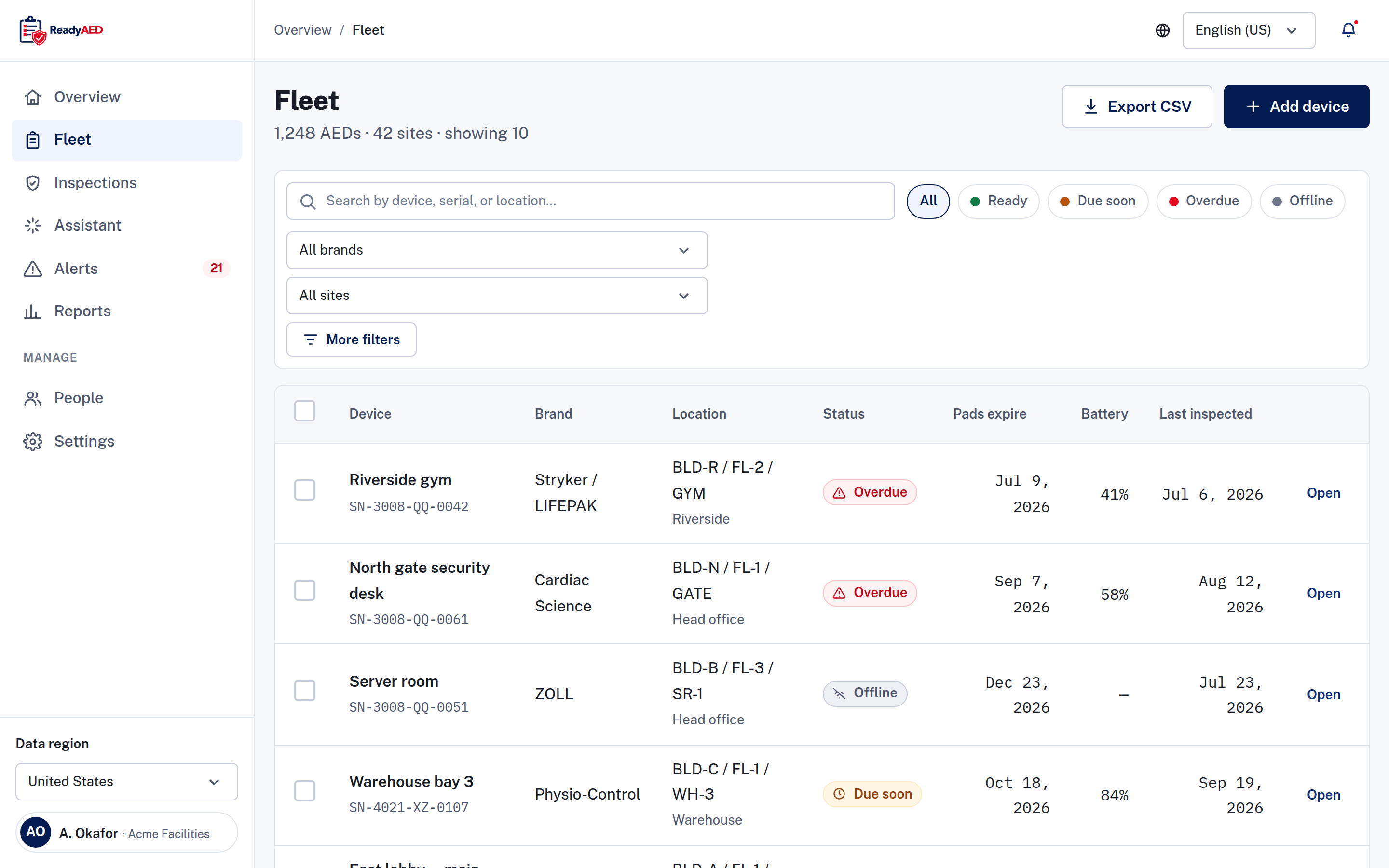
Five claims carry the argument for ReadyAED. Three map to a screen in the product, and each one states where it stops.
Any brand, one register
ReadyAED is hardware-agnostic. One register holds AEDs of any brand. Each device record keeps the brand, model, serial number, asset ID, site and location path. You filter the register by status, brand or site, and you search by device, serial number or location. The register uses one status model with four states: Ready, Due soon, Overdue and Offline. Each state carries an icon and a word, so status never depends on color alone.
Inspections on a phone, in five lines
The inspection flow runs in the browser on Android and iOS phones. ReadyAED does not ship a native app. The checklist has five lines: pads sealed and in date, status indicator shows ready, battery within range, cabinet unlocked and unobstructed, rescue kit sealed and complete. Your team answers each line Pass, Fail or N/A, and every line must be answered before the inspection can be completed. A failed line creates a follow-up task automatically. Notes and photos are optional.
One flat rate for the software
ReadyAED charges one flat rate. The price is approved price. The product is software only. ReadyAED sells no hardware and no consumables, and it does not make or sell defibrillators. Consumables are fulfilled by partners, and you create a purchase order in the app. See Pricing for what the flat rate covers.
Company SSO works today
Your team signs in with a work email and password or with company SSO. named SSO identity providers, if any The product team has not confirmed REST API, webhook or HRIS integration details, so this page does not list them. product confirmation of REST API, webhooks and HRIS/EHS integrations, with named systems If you need an integration, ask about it in the demo before you plan a rollout.
Compliance records and partner-delivered medical direction
Compliance support means record keeping: inspection records, device history and an audit trail in one place, exportable as a report, a CSV file or a device history. Medical direction is delivered through licensed physician partners, not by ReadyAED. named medical-direction partners and the markets they cover State-law guidance is general information, not legal advice. legal-approved disclaimer text this passage needs legal sign-off See Medical direction explained for the partner model.
The comparison table, with the date we checked it
The table compares ReadyAED with the models buyers see most often. Competitor statements come from the competitor's own page.
Last verified 23 September 2026. Sources are listed on this page.
| Capability | ReadyAED | The market, as published |
|---|---|---|
| Product type | Software only. No hardware and no consumables. | Some options pair the software with hardware or a service bundle (ZOLL, Stryker, Readiness Systems). |
| Brands in one register | AEDs of any brand in one register. Each record keeps its own brand, model and serial number. | Remote monitoring at Stryker covers Stryker AEDs. AED Log states that it supports every AED manufacturer. |
| Inspection flow | Five-line checklist on a phone. Every line must be answered. A failed line creates a follow-up task. | ZOLL lists the CheckAED mobile app with QR scanning. Stryker describes inspections as part of its managed program service. Cardiac Life includes a yearly on-site inspection in its top package only. |
| Automatic monitoring | Not offered. ReadyAED records inspections and inspection history. It has no cameras, sensors or telemetry. | Camera or cellular monitoring is available from other vendors. Readiness Systems uses a camera per AED, and ZOLL uses a cellular module. |
| Medical direction | Delivered through licensed physician partners. ReadyAED does not practice medicine. named medical-direction partners and the markets they cover | Readiness Systems lists medical direction among its compliance services. |
| Records and audit trail | Inspection records, device history and an audit trail, exportable as a report, CSV or device history. | AED Log tracks inspections, pad and battery expiry and CPR/AED certification. An audit trail is not described on its pages. |
What ReadyAED does not do
The limits matter as much as the features. These items are open or not offered:
- No hardware, cameras, sensors or telemetry. ReadyAED is software only.
- No native mobile app. The inspection flow runs in the browser.
- Offline inspections are not confirmed. confirmation that inspections work without a network, and how records sync
- OCR expiry capture is not demonstrated. product confirmation and screenshot of OCR expiry capture
Which AED management software is best for your fleet?
There is no single best option. The right answer follows the fleet and the budget. ReadyAED fits a mixed fleet and a software-only purchase. ZOLL PlusTrac and Stryker LIFELINKcentral are built around their own devices, as their pages state. Compare with ZOLL PlusTrac and compare with Stryker LIFELINKcentral cover the details. The Alternatives hub lists every option we track, one line each, and links each full comparison we publish.
Customer proof, when a customer approves it
These items are open:
- Customer quote and name: customer quote and name — needs written customer approval
- Units under management and site counts: approved units under management and site counts
- Customer logos: customer logo wall — needs approved customers
Moving off an incumbent, one site at a time
Moving takes planning.
The Fleet screen adds devices one at a time. confirmation of bulk import or migration tooling
A path that works today
- Export your current records from the incumbent and keep the file.
- Add your sites and locations to ReadyAED.
- Add each device with its serial number, asset ID and pads expiry date.
- Upload manuals, certificates and service records to each device record.
- Invite the site staff who run inspections.
- Run the first inspections and compare the record with your old file.
Start with one site and one inspection cycle. When the register matches your old records, add the next site. If you track AEDs in a spreadsheet today, Compare with spreadsheets covers the differences.
Run your own numbers
The ROI calculator turns your fleet size, sites, inspection frequency and staff cost into an estimate. It shows the result before it asks for an email, and it labels every value as an estimate.
See ReadyAED with your own fleet
In a 30-minute demo we walk through the register, the inspection flow and the records path, with your sites and your brands. Bring the questions this comparison raised.